
Modern AI is supposed to require massive GPUs, enormous cloud clusters, and billions of dollars in infrastructure. Yet somehow, llama.cpp can run surprisingly capable large language models on a laptop CPU, a MacBook, or even embedded hardware. In quant finance, low-latency systems are built around the same principles that make llama.cpp fast: cache efficiency, predictable memory access, SIMD acceleration, aggressive optimization, and minimizing unnecessary abstraction layers. High-frequency trading firms spend years optimizing nanoseconds out of market data pipelines, order routing systems, and pricing engines. Modern LLM inference is increasingly facing similar constraints. What are the secrets of the llama.cpp internals?
1.What is Lama.cpp?
llama.cpp is a high-performance C/C++ inference engine designed to run large language models (LLMs) efficiently on local hardware.
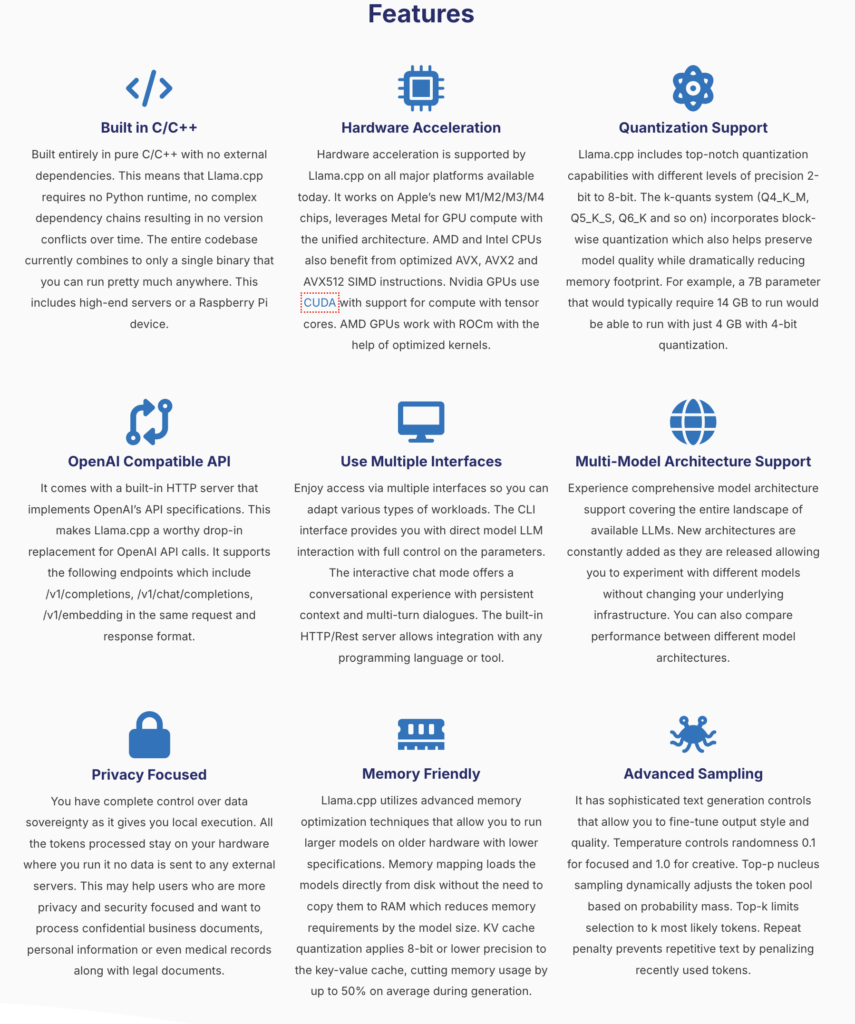
Originally created to run Meta’s LLaMA models on consumer CPUs, it has evolved into one of the most widely used runtimes for local AI inference. The features combine efficient quantization support, multi-model compatibility, advanced token sampling strategies, privacy-focused local inference, and highly optimized CPU/GPU execution.
2.What’s inside llama.cpp?
So, what are those llama.cpp internals? It begins with tokenization, where input text is split into discrete tokens and mapped to numerical IDs. These tokens are then converted into dense vector embeddings that represent semantic meaning in a form the model can efficiently process. The embeddings flow through the Transformer network, which is the core of the model and is responsible for most of the computation through stacked layers of self-attention and feed-forward operations. The Transformer outputs logits over the entire vocabulary, which are then passed through a sampling strategy to select the next token. This token is appended to the context, and the process repeats in an autoregressive loop until the output is complete.
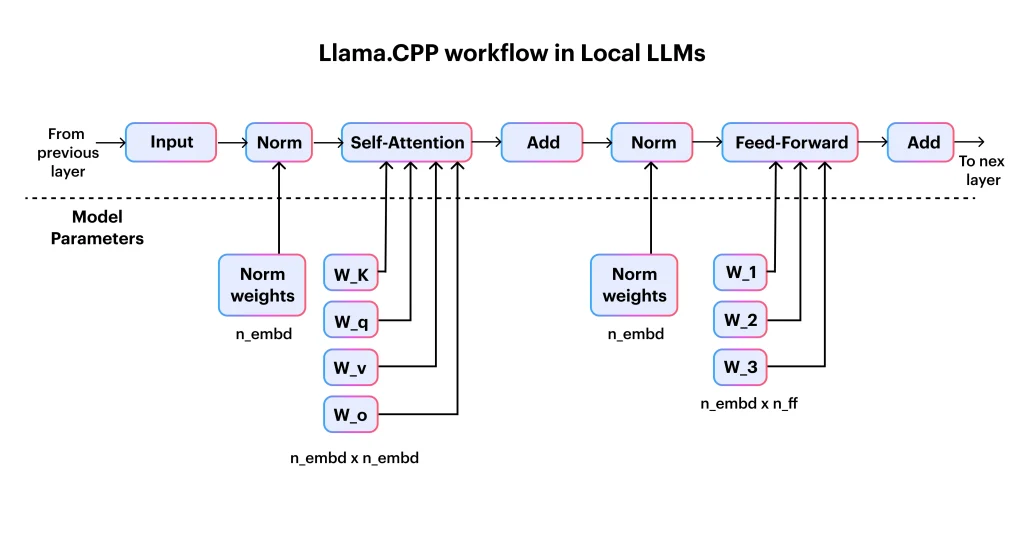
To make this efficient on consumer hardware, llama.cpp relies on key systems-level optimizations such as quantized weights and the KV cache, which reuses previously computed attention states to avoid redundant work during long context generation.
KV-Caching is really where the secret sauce is, avoiding to recompute the attention over the entire input sequence at every new token generation step by storing and reusing previously computed key and value tensors from earlier tokens:
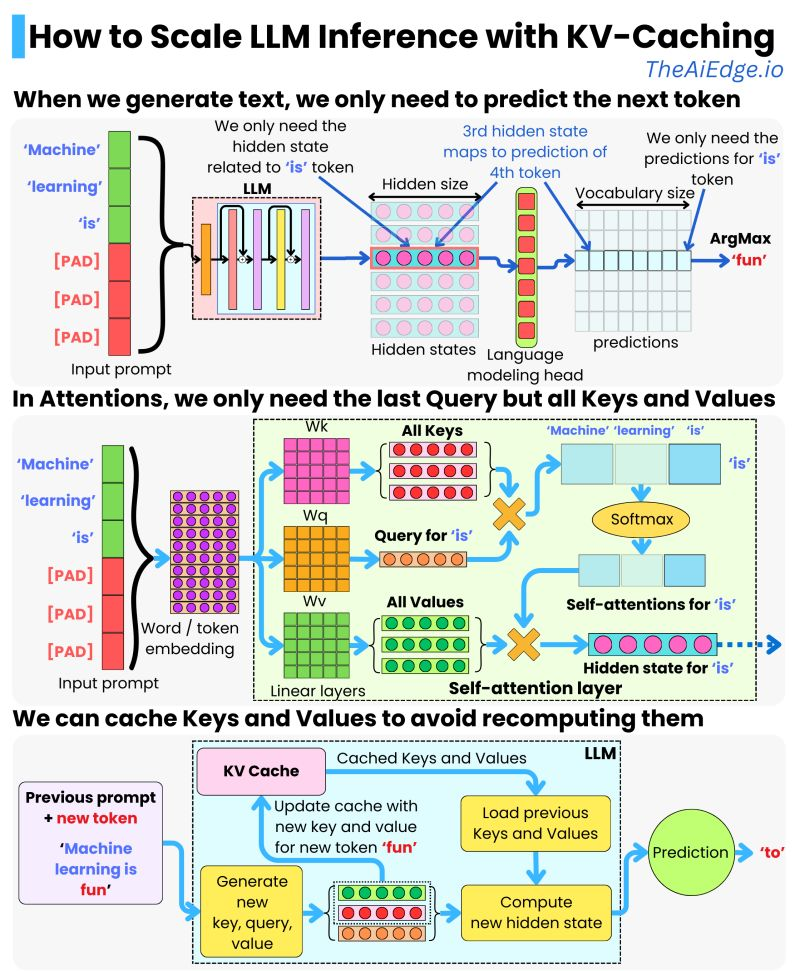
The consequences on performance are impressive both in terms of latency:
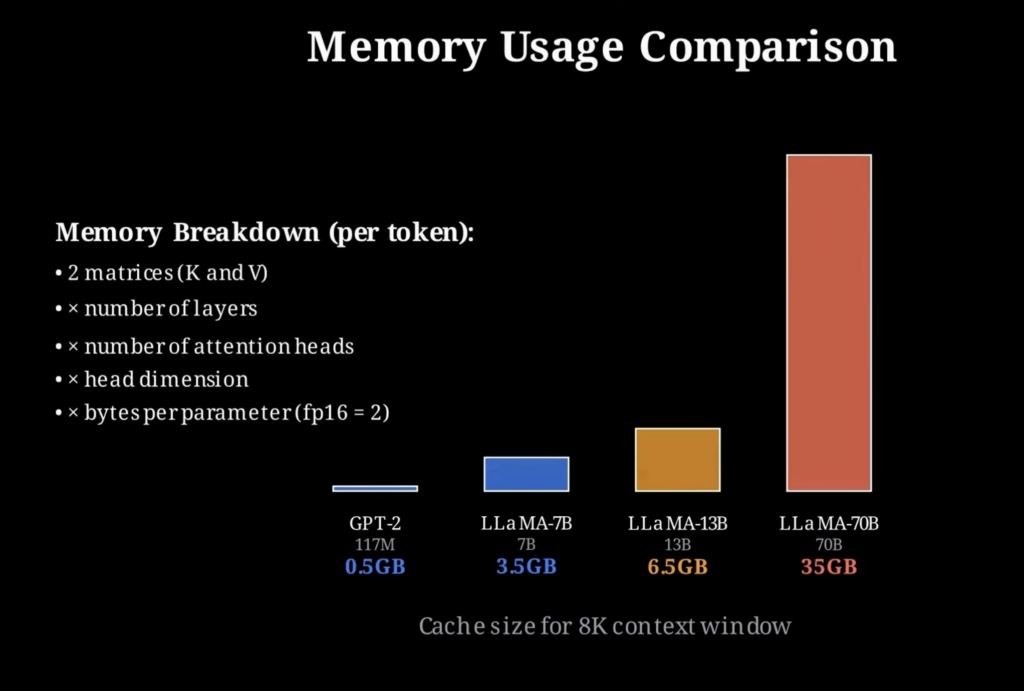
But there is no free lunch: the speed comes at the cost of increased memory usage, since the KV cache must store intermediate key and value tensors for every token in the context, and this footprint grows linearly with sequence length.
The breakdown of memory needed by token is unforgiving:

3.Install llama.cpp
You can install llama.cpp in a few different ways depending on whether you want control, speed of setup, or deployment flexibility.
The most common approach is to build it from source. This gives you full control over compilation flags and performance optimizations, and produces the core binaries like llama-cli and llama-server.
git clone https://github.com/ggml-org/llama.cpp
cd llama.cpp

cmake -B build
cmake --build build -j
Once built, you can immediately run a model using the CLI by pointing it to a GGUF file and providing a prompt for generation.
./build/bin/llama-cli -m models/model.gguf -p "Explain risk parity in finance" -n 200If you want to skip compilation entirely, prebuilt binaries (when available for your platform) let you run inference directly. This is useful for quick testing or experimentation without setting up a build environment.
./llama-cli -m model.gguf -p "What is CAPM?" -n 200For a more isolated and reproducible setup, you can run llama.cpp inside Docker. This avoids local dependency issues and is often used for deployment or server environments.
docker run -it --rm \
  -v $(pwd)/models:/models \
  ghcr.io/ggml-org/llama.cpp:latest \
  llama-cli -m /models/model.gguf -p "Explain portfolio optimization" -n 200
To expose inference as a service, you can run the built-in server mode inside Docker and interact with it via HTTP, which is useful for integrating LLMs into applications or internal tools.
docker run -it --rm \
  -p 8080:8080 \
  -v $(pwd)/models:/models \
  ghcr.io/ggml-org/llama.cpp:latest \
  llama-server -m /models/model.gguf --host 0.0.0.0 --port 8080
You can then query it like a simple API endpoint, which is often how it is integrated into larger systems.
curl http://localhost:8080/completion -d '{
  "prompt": "Explain Sharpe ratio",
  "n_predict": 150
}'
On supported hardware, you can optionally enable GPU or accelerator backends during compilation to improve performance significantly. On Apple Silicon this uses Metal acceleration, while NVIDIA systems can use CUDA.
cmake -B build -DGGML_METAL=ON
cmake --build build -j
4. Some Use Cases for Quantitative Finance
In quantitative finance, llama.cpp internals matter and running models locally with llama.cpp is not about replacing trading systems, but about accelerating research, analysis, and decision support with low-latency, privacy-preserving inference.
One of the most immediate use cases is research assistance for strategy development. A local LLM can be used to explain or prototype ideas like portfolio optimization, factor models, or risk parity without sending sensitive research data to external APIs. Optimized llama.cpp internals play a big role!
Want to explain something in your portfolio optimization process?
./llama-cli -m model.gguf \
  -p "Explain how mean-variance optimization is used in portfolio construction and derive the objective function" \
  -n 300
Another practical use case is market microstructure analysis. Models can help summarize or interpret order book dynamics, liquidity conditions, or short-term price signals, which are often difficult to reason about quickly during research.
./llama-cli -m model.gguf \
  -p "How does order book imbalance relate to short-term price movement in high-frequency trading?" \
  -n 250
llama.cpp is also useful for risk analysis and scenario reasoning. Quant teams can use it to generate explanations or structured breakdowns of risk metrics, stress testing approaches, and portfolio exposure.
./llama-cli -m model.gguf \
  -p "Compare VaR and CVaR and explain when each measure can fail under extreme market conditions" \
  -n 300
A more advanced application is integrating llama.cpp into internal tools for research workflows. Since it can run as a local server, it can power internal copilots that sit next to proprietary datasets, allowing analysts to query models without exposing sensitive information externally.
./llama-server -m model.gguf --host 0.0.0.0 --port 8080Finally, in low-latency environments, llama.cpp can be embedded directly into C++ systems for fast inference. While it is not used for execution-critical trading decisions, it can support real-time analytics, research dashboards, or decision-support tools where response time and data locality matter.
llama_model * model = llama_load_model_from_file("model.gguf", llama_model_default_params());
llama_context * ctx = llama_new_context_with_model(model, llama_context_default_params());

const char * prompt = "Explain pairs trading using a Kalman filter";
llama_eval(ctx, prompt, strlen(prompt), 0, 8);

char output[1024];
llama_get_next_token(ctx, output, sizeof(output));
printf("%s\n", output);
Overall, the value of llama.cpp in quantitative finance comes from its ability to bring LLM inference closer to the data and the system: reducing latency, improving privacy, and enabling tight integration with existing C++-based research and infrastructure stacks.
5. Alternatives to llama.cpp
While llama.cpp is one of the most popular runtimes for local LLM inference, especially on CPUs, there are several alternatives depending on whether you prioritize GPU throughput, production serving, or ecosystem tooling.
One major alternative is vLLM, which is designed for high-throughput GPU inference. It uses techniques like paged attention to efficiently manage memory during batching and is widely used in production LLM serving systems where throughput matters more than CPU efficiency.
pip install vllm

python -m vllm.entrypoints.openai.api_server \
  --model meta-llama/Llama-3-8B-Instruct
Another option is TensorRT-LLM, which is highly optimized for NVIDIA GPUs. It focuses on maximizing inference speed using low-level kernel optimizations and is commonly used in enterprise-grade deployments where GPU performance is critical.
trtllm-build --model llama-3-8b
trtllm-run --engine model.engine
For more general-purpose deep learning workflows, PyTorch (with Hugging Face Transformers) remains the most flexible option. It is not optimized for CPU inference like llama.cpp, but it is widely used for prototyping, fine-tuning, and research.
from transformers import AutoModelForCausalLM, AutoTokenizer

model = AutoModelForCausalLM.from_pretrained("meta-llama/Llama-3-8B")
tokenizer = AutoTokenizer.from_pretrained("meta-llama/Llama-3-8B")

inputs = tokenizer("Explain portfolio optimization", return_tensors="pt")
outputs = model.generate(**inputs, max_new_tokens=200)
For Apple devices, MLX is an emerging alternative optimized specifically for Apple Silicon. It provides a more native experience on macOS compared to CUDA-centric stacks and is designed for efficient local inference.
import mlx_lm

model, tokenizer = mlx_lm.load("mlx-community/Llama-3-8B")
mlx_lm.generate(model, tokenizer, "Explain risk parity", max_tokens=200)
Finally, Ollama provides a higher-level abstraction over local LLMs, including llama.cpp under the hood in many cases. It focuses on developer experience, making it easy to run models locally with minimal setup.
ollama run llama3 "Explain the Sharpe ratio"In summary:
- llama.cpp → best for CPU inference, low-latency local systems, edge deployment thanks to llama.cpp internals
- vLLM / TensorRT-LLM → best for high-throughput GPU serving
- Transformers (PyTorch) → best for research and flexibility
- MLX → best for Apple Silicon native performance
- Ollama → best for simple developer experience
Each tool occupies a different layer of the LLM stack, from research flexibility to production-scale inference to lightweight local execution