C++ for Quants
  • Home
  • News
  • Contact
  • About
Category:

Libraries

C++ Clang Formatter
IDELibraries

Clang Formatting for C++: An Overview of Clang-Format

by Clement D. November 23, 2025

Maintaining consistent C++ style across a large codebase is one of the simplest ways to improve readability, reduce onboarding time, and prevent unnecessary merge conflicts. Yet many C++ teams, especially in quantitative finance, where codebases grow organically over years still rely on manual style conventions or developer-specific habits. The result is familiar: inconsistent indentation, mixed brace styles, scattered spacing rules, and code that “looks” different depending on who touched it last. Clang-Format solves this problem. What is Clang formatting for C++?

Part of the Clang and LLVM ecosystem, clang-format is a fast, deterministic, fully automated C++ formatter that rewrites your source code according to a predefined set of style rules. Instead of arguing about formatting in code reviews or spending time manually cleaning up diffs, quant developers can enforce a single standard across an entire pricing or risk library automatically and reproducibly.

1.What is the Clang and LLVM ecosystem?

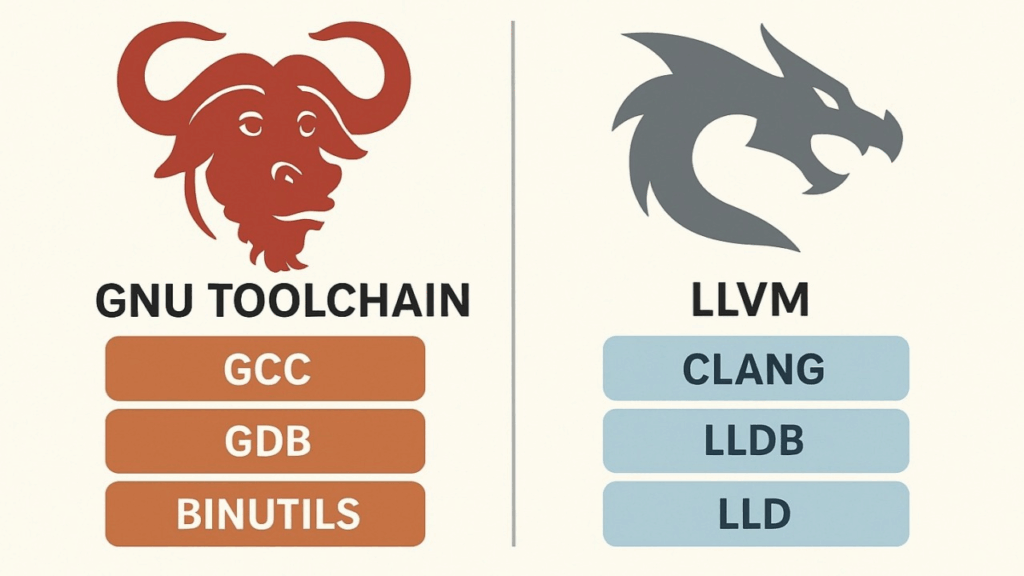
The Clang and LLVM ecosystem is a modern, modular compiler toolchain used for building, analyzing, and optimizing C++ (and other language) programs. Clang is the front-end: it parses C++ code, checks syntax and types, produces highly readable diagnostics, and generates LLVM’s intermediate representation (IR). LLVM is the backend: a collection of reusable compiler components that optimize the IR and generate machine code for many architectures (x86-64, ARM, etc.). Unlike monolithic compilers like GCC, the Clang/LLVM stack is built as independent libraries, which makes it incredibly flexible.

This design allows developers to build tools such as clang-format, clang-tidy, source-to-source refactoring engines, static analyzers, and custom compiler plugins. The ecosystem powers modern IDE features, code intelligence, and even JIT-compiled systems.

Because of its modularity, fast compilation, modern C++ standard support, and rich tooling, Clang/LLVM has become the backbone of many large C++ codebases, including those used in finance, gaming, scientific computing, and operating systems like macOS.

2.Clang-Format: The Modern Standard for C++ Code Formatting

Clang-format has become the default choice for formatting C++ code across many industries, from finance to large-scale open-source projects. Built on top of the Clang and LLVM ecosystem, it provides a fast, deterministic, and fully automated way to enforce consistent style rules across an entire codebase.

Instead of relying on ad-hoc conventions or individual preferences, teams can define a single .clang-format configuration and apply it uniformly through editors, CI pipelines, and pre-commit hooks. The result is cleaner diffs, fewer formatting discussions in code reviews, and a more maintainable codebase—crucial benefits for large C++ systems such as pricing engines, risk libraries, or high-performance trading infrastructure.

3.Installation

How to start using Clang formatting for C++? Let’s start with installation.

I’m using mac, and it’s as simple as:

➜  ~ brew install clang-format

==> Fetching downloads for: clang-format
✔︎ Bottle Manifest clang-format (21.1.6)            [Downloaded   12.7KB/ 12.7KB]
✔︎ Bottle clang-format (21.1.6)                     [Downloaded    1.4MB/  1.4MB]
==> Pouring clang-format--21.1.6.sonoma.bottle.tar.gz
🍺  /usr/local/Cellar/clang-format/21.1.6: 11 files, 3.4MB
==> Running `brew cleanup clang-format`...

With linux, it would also be as simple as:

➜  ~ sudo apt-get install clang-format

To get a general overview of the tool, just run the –help command:

➜  ~ clang-format --help

OVERVIEW: A tool to format C/C++/Java/JavaScript/JSON/Objective-C/Protobuf/C# code.

If no arguments are specified, it formats the code from standard input
and writes the result to the standard output.
If <file>s are given, it reformats the files. If -i is specified
together with <file>s, the files are edited in-place. Otherwise, the
result is written to the standard output.

USAGE: clang-format [options] [@<file>] [<file> ...]

OPTIONS:

Clang-format options:

  --Werror                       - If set, changes formatting warnings to errors
  --Wno-error=<value>            - If set, don't error out on the specified warning type.
    =unknown                     -   If set, unknown format options are only warned about.
                                     This can be used to enable formatting, even if the
                                     configuration contains unknown (newer) options.
                                     Use with caution, as this might lead to dramatically
                                     differing format depending on an option being
                                     supported or not.
  --assume-filename=<string>     - Set filename used to determine the language and to find
                                   .clang-format file.
                                   Only used when reading from stdin.
                                   If this is not passed, the .clang-format file is searched
                                   relative to the current working directory when reading stdin.
                                   Unrecognized filenames are treated as C++.
                                   supported:
                                     CSharp: .cs
                                     Java: .java
                                     JavaScript: .js .mjs .cjs .ts
                                     Json: .json .ipynb
                                     Objective-C: .m .mm
                                     Proto: .proto .protodevel
                                     TableGen: .td
                                     TextProto: .txtpb .textpb .pb.txt .textproto .asciipb
                                     Verilog: .sv .svh .v .vh
  --cursor=<uint>                - The position of the cursor when invoking
                                   clang-format from an editor integration
  --dry-run                      - If set, do not actually make the formatting changes
  --dump-config                  - Dump configuration options to stdout and exit.
                                   Can be used with -style option.
  --fail-on-incomplete-format    - If set, fail with exit code 1 on incomplete format.
  --fallback-style=<string>      - The name of the predefined style used as a
                                   fallback in case clang-format is invoked with
                                   -style=file, but can not find the .clang-format
                                   file to use. Defaults to 'LLVM'.
                                   Use -fallback-style=none to skip formatting.
  --ferror-limit=<uint>          - Set the maximum number of clang-format errors to emit
                                   before stopping (0 = no limit).
                                   Used only with --dry-run or -n
  --files=<filename>             - A file containing a list of files to process, one per line.
  -i                             - Inplace edit <file>s, if specified.
  --length=<uint>                - Format a range of this length (in bytes).
                                   Multiple ranges can be formatted by specifying
                                   several -offset and -length pairs.
                                   When only a single -offset is specified without
                                   -length, clang-format will format up to the end
                                   of the file.
                                   Can only be used with one input file.
  --lines=<string>               - <start line>:<end line> - format a range of
                                   lines (both 1-based).
                                   Multiple ranges can be formatted by specifying
                                   several -lines arguments.
                                   Can't be used with -offset and -length.
                                   Can only be used with one input file.
  -n                             - Alias for --dry-run
  --offset=<uint>                - Format a range starting at this byte offset.
                                   Multiple ranges can be formatted by specifying
                                   several -offset and -length pairs.
                                   Can only be used with one input file.
  --output-replacements-xml      - Output replacements as XML.
  --qualifier-alignment=<string> - If set, overrides the qualifier alignment style
                                   determined by the QualifierAlignment style flag
  --sort-includes                - If set, overrides the include sorting behavior
                                   determined by the SortIncludes style flag
  --style=<string>               - Set coding style. <string> can be:
                                   1. A preset: LLVM, GNU, Google, Chromium, Microsoft,
                                      Mozilla, WebKit.
                                   2. 'file' to load style configuration from a
                                      .clang-format file in one of the parent directories
                                      of the source file (for stdin, see --assume-filename).
                                      If no .clang-format file is found, falls back to
                                      --fallback-style.
                                      --style=file is the default.
                                   3. 'file:<format_file_path>' to explicitly specify
                                      the configuration file.
                                   4. "{key: value, ...}" to set specific parameters, e.g.:
                                      --style="{BasedOnStyle: llvm, IndentWidth: 8}"
  --verbose                      - If set, shows the list of processed files

Generic Options:

  --help                         - Display available options (--help-hidden for more)
  --help-list                    - Display list of available options (--help-list-hidden for more)
  --version                      - Display the version of this program

4.Usage

Imagine a messy piece of C++ code calculating DVA with formatting problems all over:

#include <iostream>
 #include<vector>
#include <cmath>

double computeDVA(const std::vector<double>& exposure,
 const std::vector<double>& pd,
   const std::vector<double> lgd, double discount)
{
double dva=0.0;
for (size_t i=0;i<exposure.size();i++){
double term= exposure[i] * pd[i] * lgd[i] *discount;
   dva+=term;
}
 return dva; }

int   main() {

std::vector<double> exposure = {100,200,150,120};
 std::vector<double> pd={0.01,0.015,0.02,0.03};
  std::vector<double> lgd = {0.6,0.6,0.6,0.6};
double discount =0.97;

double dva = computeDVA(exposure,pd,lgd,discount);

 std::cout<<"DVA: "<<dva<<std::endl;

return 0;}

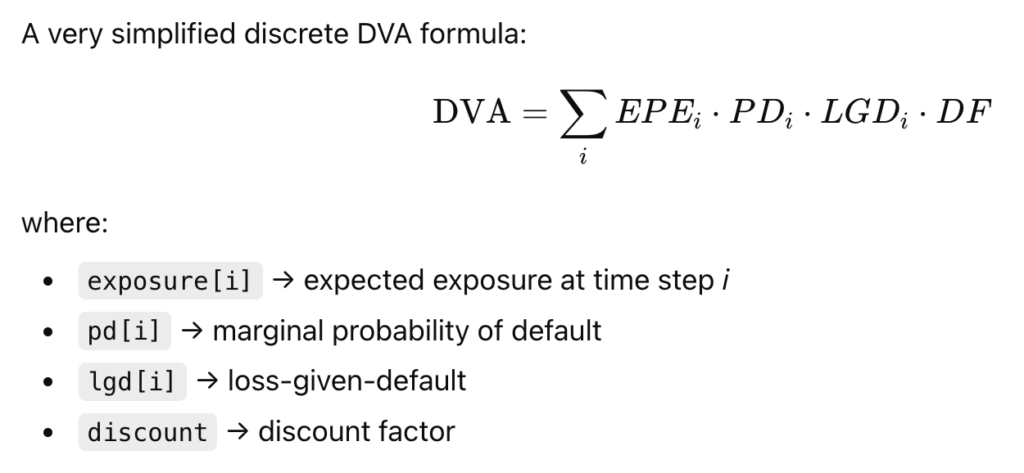
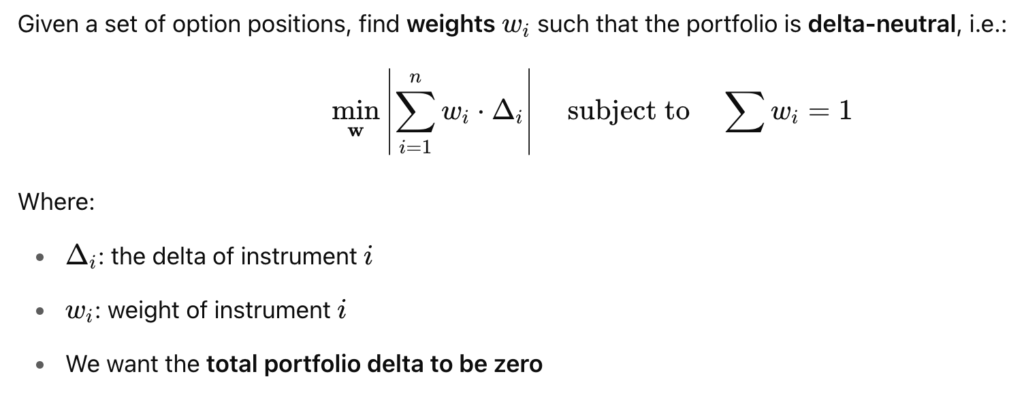
This respects the general DVA formula (from the XVA family):

Let’s format it with clang-format using the LLVM style, I run:

clang-format -i -style=LLVM dva.cpp

with:

-i = overwrite the file in place
-style=LLVM = apply the LLVM formatting style

It becomes sweet and nice:

#include <cmath>
#include <iostream>
#include <vector>

double computeDVA(const std::vector<double> &exposure,
                  const std::vector<double> &pd, const std::vector<double> lgd,
                  double discount) {
  double dva = 0.0;
  for (size_t i = 0; i < exposure.size(); i++) {
    double term = exposure[i] * pd[i] * lgd[i] * discount;
    dva += term;
  }
  return dva;
}

int main() {

  std::vector<double> exposure = {100, 200, 150, 120};
  std::vector<double> pd = {0.01, 0.015, 0.02, 0.03};
  std::vector<double> lgd = {0.6, 0.6, 0.6, 0.6};
  double discount = 0.97;

  double dva = computeDVA(exposure, pd, lgd, discount);

  std::cout << "DVA: " << dva << std::endl;

  return 0;
}

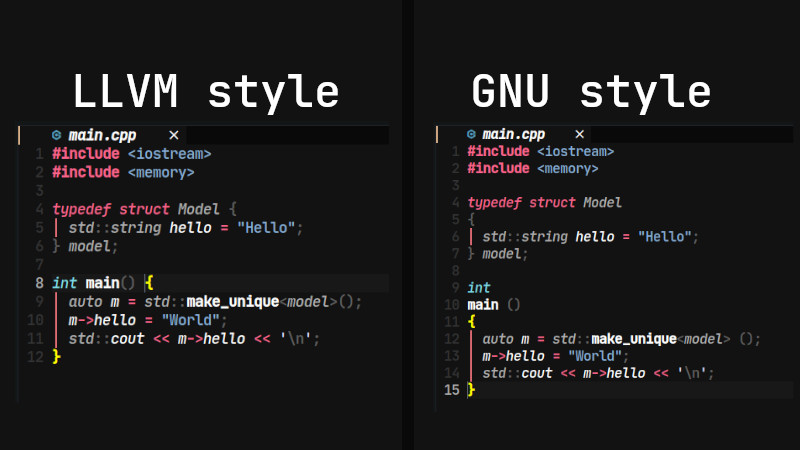
5. A List and Comparison of The Clang Styles

Formatting styles in clang-format come from real, large-scale C++ codebases: LLVM, Google, Chromium, Mozilla, and others. Each style reflects the conventions of the organization that created it, and each emphasizes different priorities such as readability, compactness, or strict consistency. While clang-format supports many styles, they all serve the same purpose: enforcing a predictable, automated layout for C++ code across complex projects. Here is an overview of Clang formatting for C++ via a list of styles available:

StyleOrigin / Used ByBrace StyleIndentationLine LengthNotable Traits
LLVMLLVM/Clang projectStroustrup-like2 spaces80Clean, minimal, modern; default for clang-format
GoogleGoogle C++ Style GuideAllman/Google2 spaces80Very consistent; strong whitespace rules
ChromiumChromium/Google ChromeK&R2 spaces80Optimized for very large codebases
MozillaFirefoxAllman2 or 4 spaces99Slightly looser than Google; readable
WebKitWebKit / SafariStroustrup4 spaces120Widely spaced; readable for UI and engine code
GNUGNU coding standardGNU style2 spaces79Uncommon now; unusual brace placements
MicrosoftMicrosoft C++/C#Allman4 spaces120Familiar to Windows devs; wide spacing
JSJavaScript projectsK&R2 spaces80For JS/TS/CSS formatting, not C++
FileCustom .clang-format———User-defined rules; highly flexible

Among all available clang-format styles, LLVM stands closest to a true industry standard for modern C++ development. Its clean, neutral layout makes it easy to read, easy to maintain, and suitable for teams of any size: from open-source contributors to quant developers in large financial institutions. Unlike more opinionated styles such as Google or GNU, LLVM avoids strong stylistic constraints and focuses instead on clarity and consistency.

This neutrality is exactly why so many projects adopt it as their base style or use it directly without modification. For quant teams working on pricing engines, risk libraries, or low-latency infrastructure, LLVM offers a stable, widely trusted foundation that integrates seamlessly into automated workflows and CI pipelines.

If you need a formatting standard that “just works” across diverse C++ codebases, LLVM is the safest and most broadly compatible choice.

6. Manage Clang Formating in your Codebase

he easiest way to standardize formatting across an entire C++ codebase is to create a .clang-format file at the root of your project. This file acts as the single source of truth for your formatting rules, ensuring every developer, editor, and CI job applies exactly the same style. Once the file is in place, running clang-format becomes fully deterministic: every file in your project will follow the same indentation, spacing, brace placement, and wrapping rules.

A .clang-format file can be as simple as one line—BasedOnStyle: LLVM—or it can define dozens of customized options tailored to your team. Developers don’t need to memorize or manually enforce formatting conventions; the file encodes all rules, and clang-format applies them automatically. Most editors (VSCode, CLion, Vim, Emacs) pick up the configuration instantly, and CI pipelines can run clang-format checks to prevent unformatted code from entering the repository.

An example of .clang-format file:

BasedOnStyle: LLVM

# Indentation & Alignment
IndentWidth: 2
TabWidth: 2
UseTab: Never

# Line Breaking & Wrapping
ColumnLimit: 100
AllowShortIfStatementsOnASingleLine: false
AllowShortFunctionsOnASingleLine: Empty

# Braces & Layout
BreakBeforeBraces: LLVM
BraceWrapping:
  AfterNamespace: false
  AfterClass: false
  AfterControlStatement: false

# Includes
IncludeBlocks: Regroup
SortIncludes: true

# Spacing
SpaceBeforeParens: ControlStatements
SpacesInParentheses: false
SpaceAfterCStyleCast: true

# C++ Specific
Standard: Latest
DerivePointerAlignment: false
PointerAlignment: Left

# Comments
ReflowComments: true

# File Types
DisableFormat: false

Put your file inside your project directory, example of structure:

my-project/
  .clang-format
  src/
    dva.cpp
    pricer.cpp

Once the .clang-format file is in place:

  • No need to specify -style
  • No need to pass config flags
  • clang-format automatically uses your project’s style rules

Just run:

clang-format -i myfile.cpp

And your team stays fully consistent.

7. Include clang-format in. a pre-commit hook

You might want to do more than that: automate the formatting when commiting to GIT.
For this, create a pre-commit hook file:

.git/hooks/pre-commit

Make it executable:

chmod +x .git/hooks/pre-commit

Paste this script inside:

#!/bin/bash

# Format only staged C++ files
files=$(git diff --cached --name-only --diff-filter=ACM | grep -E "\.(cpp|hpp|cc|hh|c|h)$")

if [ -z "$files" ]; then
    exit 0
fi

echo "Running clang-format on staged C++ files..."

for file in $files; do
    clang-format -i "$file"
    git add "$file"
done

echo "Clang-format applied."

What it does:

  • Detects staged C++ files only
  • Runs clang-format using your .clang-format rules
  • Re-adds the formatted files to the commit
  • Prevents style drift or “format fixes” later
  • Completely automatic

This means a developer cannot commit unformatted C++ code.

November 23, 2025 0 comments
Quant Finance Software Guide
DatabasesLibraries

The Ultimate Guide to Quant Finance Software

by Clement D. November 22, 2025

This guide provides a comprehensive overview of the entire quant software stack used in global markets: spanning real-time market data, open-source analytics frameworks, front-to-back trading systems, risk engines, OMS/EMS platforms, and execution technology. From Bloomberg and FactSet to QuantLib, Strata, Murex, and FlexTrade, we break down the tools that power pricing, valuation, portfolio management, trading, data engineering, and research. Welcome to the ultimate guide to quant finance software!

1. Market Data Providers

Market data is the foundation of every quant finance software. From real-time pricing and order-book feeds to evaluated curves, fundamentals, and alternative datasets, these providers supply the core inputs used in pricing models, risk engines, trading systems, and research pipelines. The vendors below represent the most widely used sources of institutional-grade financial data across asset classes.

Bloomberg

Bloomberg is one of the most widely used financial data platforms in global markets, providing real-time and historical pricing, reference data, analytics, and news. Its Terminal, APIs, and enterprise data feeds power trading desks, risk engines, and quant research pipelines across asset classes.

Key Capabilities

  • Real-time market data across equities, fixed income, FX, commodities, and derivatives
  • Historical time series for pricing, curves, and macroeconomic data
  • Reference datasets including corporate actions, fundamentals, and identifiers
  • Bloomberg Terminal tools for analytics, charting, and trading workflows
  • Enterprise data feeds (BPIPE) for low-latency connectivity
  • API & SDK access for Python, C++, and other languages (BLPAPI)

Typical Quant/Engineering Use Cases

  • Pricing & valuation models
  • Curve construction and calibration
  • Risk factor generation
  • Time-series research and statistical modelling
  • Backtesting & market data ingestion
  • Integration with execution and OMS systems

Supported Languages

C++, Python, Java, C#, via clients, REST APIs and connectors.

Official Resources

  • API Documentation
  • Data Products Catalogue
  • Bloomberg Terminal

FactSet

FactSet is a comprehensive financial data and analytics platform widely used by institutional investors, asset managers, quants, and risk teams. It provides global market data, fundamental datasets, portfolio analytics, screening tools, and an extensive API suite that integrates directly with research and trading workflows.

Key Capabilities

  • Global equity and fixed income pricing
  • Detailed company fundamentals, estimates, and ownership data
  • Portfolio analytics and performance attribution
  • Screening and factor modelling tools
  • Real-time and historical market data feeds
  • FactSet API, SDKs, and data integration layers

Typical Quant/Engineering Use Cases

  • Equity and multi-asset factor research
  • Time-series modelling and forecasting
  • Portfolio construction and optimization
  • Backtesting with fundamental datasets
  • Performance attribution & risk decomposition
  • Data ingestion into quant pipelines and research notebooks

Supported Languages

Python, R, C++, Java, .NET, via clients, REST APIs and connectors.

Official Resources

Developer Documentation
Product Overview Pages
Factset Workstation

ICE

ICE Data Services provides real-time and evaluated market data, fixed income pricing, reference data, and analytics used across trading desks, risk systems, and regulatory workflows. Known for its deep coverage of credit and rates markets, ICE is a major provider of bond evaluations, yield curves, and benchmark indices used throughout global finance.

Key Capabilities

  • Evaluated pricing for global fixed income securities
  • Real-time and delayed market data across asset classes
  • Reference and corporate actions data
  • Yield curves, volatility surfaces, and benchmarks
  • Index services (e.g., ICE BofA indices)
  • Connectivity solutions and enterprise data feeds
  • Regulatory & transparency datasets (MiFID II, TRACE)

Typical Quant/Engineering Use Cases

  • Bond pricing, fair-value estimation, and curve construction
  • Credit risk modelling (spreads, liquidity, benchmarks)
  • Backtesting fixed income strategies
  • Time-series research on rates and credit products
  • Regulatory and compliance reporting
  • Feeding risk engines & valuation models with evaluated pricing

Supported Languages

Python, C++, Java, .NET, REST APIs (via ICE Data Services platforms).

Official Resources

ICE Website
ICE Data Analytics
ICE Fixed Income and Data Services

Refinitiv (LSEG)

Refinitiv (LSEG Data & Analytics) is one of the largest global providers of financial market data, analytics, and trading infrastructure. Offering deep cross-asset coverage, Refinitiv delivers real-time market data, historical timeseries, evaluated pricing, and reference data used by quants, risk teams, traders, and asset managers. Through flagship platforms like DataScope, Workspace, and the Refinitiv Data Platform (RDP), it provides high-quality data across fixed income, equities, FX, commodities, and derivatives.

Key Capabilities

  • Evaluated pricing for global fixed income, including complex OTC instruments
  • Real-time tick data across equities, FX, fixed income, commodities, and derivatives for quant finance software
  • Deep reference data, symbology, identifiers, and corporate actions
  • Historical timeseries & tick history (via Refinitiv Tick History)
  • Yield curves, vol surfaces, term structures, and macroeconomic datasets
  • Powerful analytics libraries via Refinitiv Data Platform APIs
  • Enterprise data feeds (Elektron, Level 1/Level 2 order books)
  • Regulatory and transparency datasets (MiFID II, trade reporting, ESG disclosures)

Typical Quant/Engineering Use Cases

  • Cross-asset pricing and valuation for bonds, FX, and derivatives
  • Building yield curves, vol surfaces, and factor models
  • Backtesting systematic strategies using high-quality historical tick data
  • Time-series research across macro, commodities, and rates
  • Risk modelling, sensitivity analysis, stress testing
  • Feeding risk engines, intraday models, and trading systems with normalized data
  • Regulatory reporting workflows (MiFID II, RTS, ESG)
  • Data cleaning, mapping, and symbology-resolution for quant pipelines

Supported Languages

Python, C++, Java, .NET, REST APIs, WebSocket APIs
(primarily delivered via Refinitiv Data Platform, Elektron APIs, and Workspace APIs

Official Resources

  • Refinitiv Website (LSEG Data & Analytics)
  • Refinitiv Data Platform (RDP) APIs
  • Refinitiv Tick History
  • Refinitiv Workspace

Quandl

Quandl (Nasdaq Data Link) is a leading data platform offering thousands of financial, economic, and alternative datasets through a unified API. Known for its clean delivery format and wide coverage, Quandl provides both free and premium datasets ranging from macroeconomics, equities, and futures to alternative data like sentiment, corporate fundamentals, and crypto. Now part of Nasdaq, it powers research, quant modelling, and data engineering workflows across hedge funds, asset managers, and fintechs.

Key Capabilities

  • Unified API for thousands of financial & alternative datasets
  • Macroeconomic data, interest rates, central bank series, and indicators
  • Equity prices, fundamentals, and corporate financials
  • Futures, commodities, options, and sentiment datasets
  • Alternative data (consumer behaviour, supply chain, ESG, crypto)
  • Premium vendor datasets from major providers
  • Bulk download & time-series utilities for research pipelines
  • Integration with Python, R, Excel, and server-side apps

Typical Quant/Engineering Use Cases

  • Factor research & systematic strategy development
  • Macro modelling, global indicators, and regime analysis
  • Backtesting equity, rates, and commodities strategies for quant finance software
  • Cross-sectional modelling using fundamentals
  • Alternative-data-driven alpha research
  • Portfolio analytics and macro-linked risk modelling
  • Building data ingestion pipelines for quant research
  • Academic quantitative finance research

Supported Languages

Python, R, Excel, Ruby, Node.js, MATLAB, Java, REST APIs

Official Resources

Nasdaq Data Link Website
Quandl API Documentation
Nasdaq Alternative Data Products

2.Developer Tools & Frameworks

QuantLib

QuantLib is the leading open-source quantitative finance library, widely used across banks, hedge funds, fintechs, and academia for pricing, curve construction, and risk analytics. A quant finance software classic! Built in C++ with extensive Python bindings, QuantLib provides a comprehensive suite of models, instruments, and numerical methods covering fixed income, derivatives, optimization, and Monte Carlo simulation. Its transparency, flexibility, and industry alignment make it a foundational tool for prototyping trading models, validating pricing engines, and building production-grade quant frameworks.

Key Capabilities

  • Full fixed income analytics: yield curves, discounting, bootstrapping
  • Pricing engines for swaps, options, exotics, credit instruments
  • Stochastic models (HJM, Hull–White, Black–Karasinski, CIR, SABR, etc.)
  • Volatility surfaces, smile interpolation, variance models
  • Monte Carlo, finite differences, lattice engines
  • Calendars, day-count conventions, schedules, market conventions
  • Robust numerical routines (root finding, optimization, interpolation)

Typical Quant/Engineering Use Cases

  • Pricing vanilla & exotic derivatives
  • Building multi-curve frameworks and volatility surfaces
  • Interest-rate modelling and calibration
  • XVA prototyping and risk-sensitivity analysis
  • Monte Carlo simulation for structured products
  • Backtesting and scenario generation
  • Teaching, research, and model validation for quant finance software
  • Serving as a pricing microservice inside larger quant platforms

Supported Languages

C++, Python (via SWIG bindings), R, .NET, Java, Excel add-ins, command-line tools

Official Resources

QuantLib Website
QuantLib Python Documentation
QuantLib GitHub Repository

Finmath

Finmath is a comprehensive open-source quant finance software library written in Java, designed for modelling, pricing, and risk analytics across derivatives and fixed income markets. It provides a modular architecture with robust implementations of Monte Carlo simulation, stochastic processes, interest-rate models, and calibration tools. finmath is widely used in academia and industry for its clarity, mathematical rigor, and ability to scale into production systems where JVM stability and performance are required.

Key Capabilities

  • Monte Carlo simulation framework (Brownian motion, Lévy processes, stochastic meshes)
  • Interest-rate models: Hull–White, LIBOR Market Model (LMM), multi-curve frameworks
  • Analytic formulas for vanilla derivatives, caps/floors, and swaps
  • Calibration engines for stochastic models and volatility structures
  • Automatic differentiation and algorithmic differentiation tools
  • Support for stochastic volatility, jump-diffusion, and hybrid models
  • Modular pricers for structured products and exotic payoffs
  • Excel, JVM-based servers, and integration with big-data pipelines

Typical Quant/Engineering Use Cases

  • Monte Carlo pricing of path-dependent and exotic derivatives
  • LMM and Hull–White calibration for rates desks
  • Structured products modelling and scenario analysis
  • XVA and exposure simulations using forward Monte Carlo
  • Risk factor simulation for regulatory stress testing
  • Model validation and prototyping in Java-based environments
  • Educational use for teaching stochastic calculus and derivatives pricing

Supported Languages

Java (core), with interfaces usable from Scala, Kotlin, and JVM-based environments; optional Excel integrations

Official Resources

finmath Library Website
finmath GitHub Repository
finmath Documentation & Tutorials

Strata

OpenGamma Strata is a modern, production-grade open-source analytics library for pricing, risk, and market data modelling across global derivatives markets. Written in Java and designed with institutional robustness in mind, Strata provides a complete framework for building and calibrating curves, volatility surfaces, interest-rate models, FX/credit analytics, and standardized market conventions. It is used widely by banks, clearing houses, and fintech platforms to power high-performance valuation services, regulatory risk calculations, and enterprise quant finance software infrastructure.

Key Capabilities

  • Full analytics for rates, FX, credit, and inflation derivatives
  • Curve construction: OIS, IBOR, cross-currency, inflation, basis curves
  • Volatility surfaces: SABR, Black, local vol, swaption grids
  • Pricing engines for swaps, options, swaptions, FX derivatives, CDS
  • Market conventions, calendars, day-count standards, trade representations
  • Robust calibration and scenario frameworks
  • Portfolio-level risk: PV, sensitivities, scenario shocks, regulatory measures
  • Built-in serialization, market data containers, and workflow abstractions

Typical Quant/Engineering Use Cases

  • Pricing and hedging of rates, FX, and credit derivatives
  • Building multi-curve frameworks for trading and risk
  • Market data ingestion and transformation pipelines
  • XVA inputs: sensitivities, surfaces, curves, calibration tools
  • Regulatory reporting (FRTB, SIMM, margin calculations)
  • Risk infrastructure for clearing, margin models, and limit frameworks
  • Enterprise-grade pricing microservices for front office and risk teams
  • Model validation and backtesting for derivatives portfolios

Supported Languages

Java (core), Scala/Kotlin via JVM interoperability, with REST integrations for enterprise deployment

Official Resources

OpenGamma Strata Website
Strata GitHub Repository
Strata Documentation & Guides
OpenGamma Blog & Technical Papers

ORE (Open-Source Risk Engine)

ORE (Open-Source Risk Engine) is a comprehensive open-source risk and valuation platform built on top of QuantLib. Developed by Acadia, ORE extends QuantLib from a pricing library into a full multi-asset risk engine capable of portfolio-level analytics, scenario-based valuation, XVA, stress testing, and regulatory risk. Written in modern C++, ORE introduces standardized trade representations, market conventions, workflow orchestration, and scalable valuation engines suitable for both research and production environments. Designed to bridge the gap between quant model development and enterprise-grade risk systems, ORE is used across banks, derivatives boutiques using quant finance software, consultancies, and academia to prototype or run real-world risk pipelines. Its modular architecture and human-readable XML inputs make it accessible for quants, engineers, and risk managers alike.

Key Capabilities

Full portfolio valuation and risk analytics: multi-asset support, standardized trade representation, market data loaders, curve builders
XVA analytics: CVA, DVA, FVA, LVA, KVA; CSA modelling and collateral simulations
Scenario-based simulation: historical and hypothetical stress tests, Monte Carlo P&L distribution, bucketed sensitivities
Risk aggregation & reporting: NPV, DV01, CS01, vega, gamma, curvature, regulatory risk (SIMM via extensions)
Production-ready workflows: XML configuration, batch engines, logging, audit reports

Typical Quant/Engineering Use Cases

Building internal XVA analytics
Prototyping bank-grade risk engines
Scenario analysis and stress testing
Independent price verification (IPV) and model validation
Collateralized curve construction
Portfolio-level aggregation and risk decomposition
Large-scale Monte Carlo simulation for quant finance software
Integrating QuantLib pricing into enterprise workflows
Teaching advanced risk and valuation concepts

Supported Languages

C++ (core engine)
Python (community bindings)
XML workflow/configuration
JSON/CSV inputs and outputs

Official Resources

ORE GitHub Repository
ORE Documentation
ORE User Guide

3.Front-to-Back Trading & Risk Platforms

Murex

Murex (MX.3) is the world’s leading front-to-back trading, risk, and operations platform used by global banks, asset managers, insurers, and clearing institutions. Known as the industry’s most comprehensive cross-asset system, Murex unifies trading, pricing, market risk, credit risk, collateral, PnL, and post-trade operations into a single integrated architecture. It is considered the “gold standard” for enterprise-scale capital markets infrastructure and remains the backbone of trading desks across interest rates, FX, equities, credit, commodities, and structured products. Built around a modular, high-performance calculation engine, MX.3 supports pre-trade analytics, trade capture, risk measurement, lifecycle management, regulatory reporting, and settlement workflows. Quants and developers frequently interface with Murex via its model APIs, scripting capabilities, and market data pipelines, making it a central component of real-world quant finance software.

Key Capabilities

Front-office analytics: real-time pricing, RFQ workflows, limit checks, scenario tools
Cross-asset trade capture: IR, FX, credit, equity, commodity, hybrid & structured products
Market risk: VaR, sensitivities (Greeks), stress testing, FRTB analytics
XVA & credit risk: CVA/DVA/FVA/MVA/KVA with CSA & netting-set modelling
Collateral & treasury: margining, inventory, funding optimization, liquidity risk
Middle & back office: confirmations, settlements, accounting, reconciliation
Enterprise data management: curves, surfaces, workflow orchestration, audit trails
High-performance computation layer: distributed risk runs, batch engines, grid scheduling

Typical Quant/Engineering Use Cases

Integrating custom pricing models and curves
Building pre-trade analytics and scenario tools for trading desks
Extracting market data, risk data, and PnL explain feeds
Setting up or validating XVA, FRTB, and regulatory risk workflows
Automating lifecycle events for structured and exotic products
Connecting Murex to in-house quant finance software libraries (QuantLib, ORE, proprietary C++ pricers)
Developing risk dashboards, overnight batch pipelines, and stress-testing frameworks
Supporting bank-wide migrations (e.g., MX.2 → MX.3, LIBOR transition initiatives)

Supported Languages & Integration

C++ for model integration and high-performance pricing components
Java for workflow extensions and service layer integration
Python for analytics, ETL, and data extraction via APIs
SQL for reporting and data interrogation
XML for configuration of trades, market data, workflows, and static data

Official Resources

Murex Website
Murex Knowledge Hub (client portal)
MX.3 Product Overview for Banks

Calypso

A unified front-to-back trading, risk, collateral, and clearing platform widely adopted by global banks, central banks, clearing houses, and asset managers. Calypso (now part of Adenza, following the merge with AxiomSL) is known for its strong coverage of derivatives, securities finance, treasury, and post-trade operations for quant finance software. It provides an integrated architecture across trade capture, pricing, risk analytics, collateral optimization, and regulatory reporting, making it a common choice for institutions seeking a modular, standards-driven system.

With a flexible Java-based framework, Calypso supports extensive customization through APIs, workflow engines, adapters, and data feeds for quant finance software. It is particularly strong in clearing, collateral management, treasury operations, and real-time event processing, making it a critical component in many bank infrastructures.

Key Capabilities

Front-office analytics: real-time valuation, pricing, trade validation, limit checks, pre-trade workflows
Cross-asset trade capture: linear/non-linear derivatives, securities lending, repos, treasury & funding products
Market risk: Greeks, VaR, stress testing, historical/MC simulation, FRTB analytics
Credit & counterparty risk: PFE, CVA/DVA, SA-CCR, IMM, netting set modelling
Collateral & clearing: enterprise margining, eligibility schedules, CCP connectivity, triparty workflows
Middle & back office: confirmations, settlements, custody, corporate actions, accounting
Enterprise integration: MQ/JMS/REST adapters, data dictionaries, workflow orchestration, regulatory reporting
Performance & computation layer: distributed risk runs, event-driven processing, batch scheduling

Typical Quant/Engineering Use Cases

Integrating custom pricers and analytics into the Java pricing framework
Building pre-trade risk tools and scenario screens for trading desks
Extracting market, risk, and PnL data for downstream analytics
Implementing or validating XVA, SA-CCR, and regulatory capital workflows
Automating collateral optimization and eligibility logic for enterprise CCP flows
Connecting Calypso to in-house quant libraries (Java, Python, C++)
Developing real-time event listeners for lifecycle, margin, and clearing events
Supporting migrations and upgrades (Calypso → Adenza cloud, major version upgrades)

Official Resources

Calypso Website

FIS

FIS is a long-established, cross-asset trading, risk, and operations platform used extensively by global banks, asset managers, and treasury departments. Known for its robust handling of interest rate and FX derivatives, Summit provides a unified environment spanning trade capture, pricing, risk analytics, collateral, treasury, and back-office processing. Despite being considered a legacy platform by many institutions, Summit remains deeply embedded in the infrastructure of Tier-1 and Tier-2 banks due to its stability, extensive product coverage, and mature STP workflows.

Built around a performant C++ core with a scripting layer (SML) and flexible integration APIs, Summit supports custom pricing models, automated batch processes, and data pipelines for both intraday and end-of-day operations. It is commonly found in banks undergoing modernization projects, cloud migrations, or system consolidation from older vendor stacks.

Key Capabilities

Front-office analytics: pricing for IR/FX derivatives, scenario analysis, position management
Cross-asset trade capture: rates, FX, credit, simple equity & commodity derivatives, money markets
Market risk: Greeks, sensitivities, VaR, stress tests, scenario shocks
Counterparty risk: PFE, CVA, exposure profiles, netting-set logic
Treasury & funding: liquidity management, cash ladders, intercompany funding
Middle & back office: confirmations, settlement instructions, accounting rules, GL integration
Collateral & margining: margin call workflows, eligibility checks, CCP/tiered clearing
Enterprise integration: SML scripts, C++ extensions, MQ/JMS connectors, batch & EOD scheduling
Performance layer: optimized C++ engine for large books, distributed batch calculations

Typical Quant/Engineering Use Cases

Integrating custom pricing functions through C++ or SML extensions
Building pre-trade risk tools, limit checks, and scenario pricing screens
Extracting risk sensitivities, exposure profiles, and PnL explain feeds for analytics
Validating credit exposure, CVA, and regulatory risk data (SA-CCR, IMM)
Automating treasury and liquidity workflows for money markets and funding books
Connecting Summit to in-house quant libraries (C++, Python, Java adapters)
Developing batch frameworks for EOD risk, PnL, data cleaning, and reconciliation
Supporting modernization programs (Summit → Calypso/Murex migration, cloud uplift, architecture rewrites)

Blackrock Aladdin

BlackRock Aladdin is an enterprise-scale portfolio management, risk analytics, operations, and trading platform used by asset managers, pension funds, insurers, sovereign wealth funds, and large institutional allocators. Known as the industry’s most powerful buy-side risk and investment management system, Aladdin integrates portfolio construction, order execution, analytics, compliance, performance, and operational workflows into a unified architecture.

Originally built to manage BlackRock’s own portfolios, Aladdin has evolved into a global operating system for investment management, delivering multi-asset risk analytics, scalable data pipelines, and tightly integrated OMS/PMS capabilities. With its emphasis on transparency, scenario analysis, and factor-based risk modelling, Aladdin has become a critical platform for institutions seeking consistency across risk, performance, and investment decision-making.

Aladdin’s open APIs, data feeds, and integration layers allow quants and engineers to plug into portfolio, reference, pricing, and factor data, making it a core component of enterprise buy-side infrastructures.

Key Capabilities

Portfolio management: construction, optimisation, rebalancing, factor exposures, performance attribution
Order & execution management (OMS): multi-asset trading workflows, pre-trade checks, compliance, routing
Risk analytics: factor models, stress tests, scenario engines, historical & forward-looking risk
Market risk & exposures: VaR, sensitivities, stress shocks, liquidity analytics
Compliance & controls: rule-based pre/post-trade checks, investment guidelines, audit workflows
Data management: pricing, curves, factor libraries, ESG data, holdings, benchmark datasets
Operational workflows: trade settlements, reconciliations, corporate actions
Aladdin Studio: development environment for custom analytics, Python notebooks, modelling pipelines
Enterprise integration: APIs, data feeds, reporting frameworks, cloud-native distribution

Typical Quant/Engineering Use Cases

Integrating custom factor models, stress scenarios, and risk methodologies into the Aladdin ecosystem
Building portfolio optimisation tools and bespoke analytics through Aladdin Studio
Connecting Aladdin to internal quant libraries, Python environments, and research pipelines
Extracting holdings, benchmarks, factor exposures, risk metrics, and P&L explain data
Developing compliance engines, rule libraries, and pre-trade limit workflows
Automating reporting, reconciliation, and operational pipelines for large asset managers
Implementing ESG analytics, liquidity risk screens, and regulatory reporting tools
Supporting enterprise-scale migrations onto Aladdin’s cloud-native environment

4.Execution & Trading Systems

Fidessa (ION)

Fidessa is the industry’s benchmark execution and order management platform for global equities, listed derivatives, and cash markets. Used by investment banks, brokers, exchanges, market makers, and large hedge funds, Fidessa delivers high-performance electronic trading, deep market connectivity, smart order routing, and algorithmic execution in a unified environment. Known for its ultra-reliable infrastructure and resilient trading architecture, Fidessa provides access to hundreds of exchanges, MTFs, dark pools, and broker algos worldwide. Its real-time market data feeds, FIX gateways, compliance engine, and execution analytics make it a foundational component of electronic trading desks. Now part of ION Markets, Fidessa remains one of the most widely deployed platforms for high-touch and low-touch equity trading, offering a robust framework for custom execution strategies and global routing logic.

Key Capabilities

Order & execution management (OMS/EMS): multi-asset order handling, care orders, low-touch flows, parent/child order management
Market connectivity: direct exchange connections, MTFs, dark pools, broker algorithms, smart order routing
Real-time market data: depth, quotes, trades, tick data, venue analytics
Algorithmic trading: strategy containers, broker algo integration, SOR logic, internal crossing
Compliance & risk controls: limit checks, market abuse monitoring, MiFID reporting, pre-trade risk
Trading workflows: high-touch blotters, sales-trader workflows, DMA tools, program trading
Back-office & operations: allocations, matching, confirmations, trade reporting
FIX infrastructure: FIX gateways, routing hubs, drop copies, OMS → EMS workflows
Performance & scalability: fault-tolerant architecture, high-availability components, low-latency market access

Typical Quant/Engineering Use Cases

Building and deploying custom algorithmic trading strategies in Fidessa’s execution framework
Integrating smart order routing logic and multi-venue liquidity analytics
Connecting Fidessa OMS to downstream risk engines, pricing models, and TCA tools
Developing real-time market data adapters, FIX gateways, and trade feed processors
Automating compliance checks, MiFID reporting, and surveillance workflows
Extracting tick data, executions, and quote streams for analytics and model calibration
Supporting program trading desks with custom basket logic and volatility-aware strategies
Managing large-scale migrations into ION’s unified trading architecture

FlexTrade (FlexTRADER)

FlexTrade’s FlexTRADER is a flagship multi-asset execution management system (EMS) designed for quantitative trading desks, asset managers, hedge funds, and sell-side execution teams. Known as one of the most customizable and algorithmically sophisticated EMS platforms, FlexTRADER provides advanced order routing, execution algorithms, real-time analytics, and seamless integration with in-house quant models.

FlexTrade distinguishes itself through its open architecture, API-driven design, and deep support for automated and systematic execution workflows. It enables institutions to build custom execution strategies, incorporate proprietary signals, integrate model-driven routing logic, and connect to liquidity across global equities, FX, futures, fixed income, and options markets. Its strong TCA tools and high configurability make it a favourite among quant, systematic, and low-latency execution teams.

Key Capabilities

Multi-asset execution: equities, FX, futures, options, fixed income, ETFs, derivatives
Algorithmic trading: broker algos, native Flex algorithms, fully custom strategy containers
Smart order routing (SOR): liquidity-seeking, schedule-based, cost-optimised routing
Real-time analytics: market impact, slippage, venue heatmaps, liquidity curves
TCA & reporting: pre-trade, real-time, and post-trade analytics with benchmark comparisons
Order & workflow management: portfolio trading, pairs trading, block orders, basket execution
Connectivity: direct market access (DMA), algo wheels, liquidity providers, dark/alternative venues
Integration APIs: Python, C++, Java, FIX, data adapters for quant signals and simulation outputs
Customisation layer: strategy scripting, UI configuration, event-driven triggers, automation rules

Typical Quant/Engineering Use Cases

Integrating proprietary execution algorithms, signals, and cost models into FlexTRADER
Developing custom SOR logic using internal market impact models
Building automated execution pipelines driven by alpha models or risk signals
Feeding FlexTrade real-time analytics into research workflows and intraday dashboards
Connecting FlexTRADER to quant libraries (Python/C++), backtesting engines, and ML-driven routing models
Automating multi-venue liquidity capture, dark pool interaction, and broker algo selection
Creating real-time TCA analytics and execution diagnostics for systematic trading teams
Supporting global multi-asset expansion, co-location routing, and high-performance connectivity

Bloomberg EMSX (Electronic Market) 

Bloomberg EMSX is the embedded execution management system within the Bloomberg Terminal, providing multi-asset trading, broker algorithm access, smart routing, and real-time analytics for institutional investment firms, hedge funds, and trading desks. As one of the most widely used execution platforms in global markets, EMSX offers seamless integration with Bloomberg’s market data, analytics, news, portfolio tools, and compliance engines, making it a central component of daily trading workflows. EMSX supports equities, futures, options, ETFs, and FX workflows, enabling traders to route orders directly from Bloomberg screens such as MONITOR, PORT, BDP, and custom analytics. Its native access to broker algorithms, liquidity providers, and execution venues—combined with Bloomberg’s unified data ecosystem—makes EMSX a powerful tool for low-touch trading, portfolio execution, and workflow automation across asset classes.

Key Capabilities

Multi-asset execution: equities, ETFs, futures, options, and FX routing
Broker algorithm access: direct integration with global algo suites (VWAP, POV, liquidity-seeking, schedule-driven)
Order & workflow management: parent/child orders, baskets, care orders, DMA routing
Real-time analytics: slippage, benchmark comparisons, market impact indicators, TCA insights
Portfolio trading: basket construction, rebalancing tools, program trading workflows
Integration with Bloomberg ecosystem: PORT, AIM, BQuant, BVAL, market data, research, news
Compliance & controls: pre-trade checks, regulatory rules, audit trails, trade reporting
Connectivity: FIX routing, broker connections, smart order routing, dark/alternative venue access
Automation & scripting: rules-based workflows, event triggers, Excel API and Python integration

Typical Quant/Engineering Use Cases

Automating low-touch execution workflows directly from Bloomberg analytics (e.g., PORT → EMSX)
Integrating broker algo selection and routing decisions into quant-driven strategies
Extracting execution, tick, and benchmark data for TCA, slippage modelling, or market impact analysis
Connecting EMSX flows to internal OMS/EMS platforms (FlexTrade, CRD, Eze, proprietary systems)
Developing Excel, Python, or BQuant-driven automation pipelines for execution and monitoring
Embedding pre-trade analytics, compliance checks, and liquidity models into EMSX order workflows
Supporting global routing, basket trading, and cross-asset execution for institutional portfolios
Leveraging Bloomberg’s unified data (fundamentals, pricing, factor data, corporate actions) for model-based trading pipelines

November 22, 2025 0 comments
best C++ ML Libraries
Libraries

Best C++ ML Libraries

by Clement D. October 3, 2025

This article explores the best C++ ML libraries, ranging from general-purpose frameworks to specialized toolkits for deep learning, linear algebra, and probabilistic modeling. Whether you’re building a high-frequency trading model, deploying AI on edge devices, or integrating ML into performance-critical systems, these libraries give you the flexibility of C++ combined with the power of modern machine learning.

1.Tensorflow

TensorFlow is one of the most widely used machine learning frameworks, originally designed with Python as its primary interface. However, it also provides a C++ API that allows developers to build and deploy ML models directly in performance-critical environments.

The C++ interface is lower-level compared to Python but offers significant advantages: reduced overhead, faster execution, and tighter integration into existing C++ systems. It is commonly used in high-performance computing, trading platforms, embedded systems, and real-time inference pipelines where every microsecond counts.

While training models in C++ is possible, it is often more practical to train in Python (using TensorFlow/Keras) and then export the model as a SavedModel or GraphDef. The C++ API is then used to load and run inference on that model.

TensorFlow’s C++ API provides tools for:

  • Loading computational graphs.
  • Executing inference sessions.
  • Managing tensors efficiently.
  • Running models on CPU or GPU with minimal overhead.

Because it is lower-level, error handling and debugging are more complex than in Python. However, once integrated, it can achieve extremely fast inference speeds.

Here’s a simple C++ snippet that demonstrates loading a TensorFlow graph and running inference:

#include "tensorflow/core/public/session.h"
#include "tensorflow/core/platform/env.h"

using namespace tensorflow;

int main() {
    Session* session;
    Status status = NewSession(SessionOptions(), &session);

    // Load a pre-trained model
    GraphDef graph_def;
    ReadBinaryProto(Env::Default(), "model.pb", &graph_def);
    session->Create(graph_def);

    // Prepare input tensor
    Tensor input(DT_FLOAT, TensorShape({1, 784})); // e.g., MNIST image

    // Run session
    std::vector<Tensor> outputs;
    session->Run({{"input_node", input}}, {"output_node"}, {}, &outputs);

    std::cout << outputs[0].matrix<float>() << std::endl;
}


2.Pytorch

PyTorch is one of the best C++ ML libraries, and its C++ distribution (LibTorch) brings its power to performance-critical applications. Unlike TensorFlow, which feels more graph-centric in C++, LibTorch offers an eager execution model very close to its Python counterpart.

LibTorch is commonly used when you need fast inference in C++ applications — for example, in trading engines, robotics, self-driving pipelines, and real-time computer vision systems. Developers can either:

  1. Train models in Python and export them via TorchScript for deployment in C++, or
  2. Train and run models directly in C++ using LibTorch’s API.

Key features include:

  • Seamless use of autograd in C++.
  • GPU acceleration with CUDA out of the box.
  • Tensor operations identical to Python PyTorch.
  • Integration with TorchScript for portable inference.

Compared to TensorFlow C++, PyTorch’s API feels more “native” and developer-friendly. It offers flexibility while maintaining high performance, making it a strong choice for production inference pipelines.

Here’s a small LibTorch snippet:

#include <torch/torch.h>
#include <iostream>

struct Net : torch::nn::Module {
    torch::nn::Linear fc{nullptr};
    Net() { fc = register_module("fc", torch::nn::Linear(784, 10)); }
    torch::Tensor forward(torch::Tensor x) { return torch::relu(fc->forward(x)); }
};

int main() {
    Net net;
    auto input = torch::randn({1, 784});
    auto output = net.forward(input);
    std::cout << output << std::endl;
}

3. MLPack

mlpack is a C++-native machine learning library designed for speed, scalability, and ease of use. Unlike TensorFlow and PyTorch, which are deep learning frameworks, mlpack specializes in classical ML algorithms such as regression, clustering, dimensionality reduction, and nearest neighbors.

Its design philosophy emphasizes:

  • High performance (optimized C++ code, often faster than Python equivalents).
  • Simplicity (intuitive, consistent API).
  • Flexibility (usable as a C++ library or via CLI/Python/Julia bindings).

mlpack shines in scenarios where deep learning isn’t necessary but you still want production-quality performance — e.g., finance, anomaly detection, recommendation systems, and embedded devices.

Some popular algorithms include:

  • k-Nearest Neighbors, k-Means, Gaussian Mixture Models.
  • Decision Trees and Random Forests.
  • Logistic and Linear Regression.
  • Collaborative Filtering.

It’s also header-only, so integration into existing C++ projects is straightforward.

Here’s a small mlpack example, training and evaluating logistic regression:

#include <mlpack/methods/logistic_regression/logistic_regression.hpp>
#include <armadillo>
#include <iostream>

int main() {
    arma::mat X; // Features
    arma::Row<size_t> y; // Labels

    X.randu(100, 10);    // 100 samples, 10 features
    y = arma::randi<arma::Row<size_t>>(100, arma::distr_param(0,1));

    mlpack::regression::LogisticRegression<> model(X, y, 0.001);

    arma::Row<size_t> predictions;
    model.Classify(X, predictions);

    std::cout << "Accuracy: " 
              << arma::accu(predictions == y) / double(y.n_elem) 
              << std::endl;
}

4.DLib

Dlib is a modern C++ toolkit containing machine learning algorithms, optimization tools, and computer vision functions. It is best known for its face detection and facial landmark recognition, but its scope is much broader, making it one of the most versatile C++ ML libraries.

Key strengths include:

  • Classical ML algorithms (SVMs, decision trees, k-means, regression).
  • Deep learning support with a clean C++ API for building neural nets.
  • Computer vision utilities (HOG detectors, object tracking, image processing).
  • Optimization solvers for linear and nonlinear problems.

Unlike TensorFlow or PyTorch, Dlib is less about large-scale deep learning and more about practical ML for real-world tasks. It’s widely used in embedded systems, robotics, finance anomaly detection, and face recognition applications.

Dlib is also header-only, making it easy to integrate into C++ projects without heavy dependencies. Its API is clean and expressive, leveraging C++11 templates and modern design.

Here’s a small example of training a Support Vector Machine (SVM) classifier with Dlib:

#include <dlib/svm_threaded.h>
#include <iostream>

int main() {
    typedef dlib::matrix<double,2,1> sample_type;
    dlib::svm_c_trainer<dlib::linear_kernel<sample_type>> trainer;
    std::vector<sample_type> samples = {{0,0}, {1,1}, {1,0}, {0,1}};
    std::vector<double> labels = {-1, 1, -1, 1};

    auto decision_function = trainer.train(samples, labels);
    sample_type test; test = 0.9, 0.9;
    std::cout << "Prediction: " << decision_function(test) << std::endl;
}
October 3, 2025 0 comments
C++26
LibrariesPerformance

C++26: The Next Big Step for High-Performance Finance

by Clement D. September 22, 2025

C++ is still the backbone of quantitative finance, powering pricing, risk, and trading systems where performance matters most. The upcoming C++26 standard is set to introduce features that go beyond incremental improvements.
Key additions like contracts, pattern matching, executors, and reflection will directly impact how quants build robust, high-performance applications. For finance, that means cleaner code, stronger validation, and better concurrency control without sacrificing speed. This article highlights what’s coming in C++26 and why it matters for high-performance finance.

1. Contracts

Contracts in C++26 bring native support for specifying preconditions and postconditions directly in the code. For quantitative finance, this means you can enforce invariants in critical libraries — for example, checking that discount factors are positive, or that volatility inputs are within expected ranges. Instead of relying on ad-hoc assert statements or custom validation layers, contracts give a standard, compiler-supported mechanism to make assumptions explicit. This improves reliability, reduces debugging time, and makes financial codebases more transparent to both developers and reviewers.

double black_scholes_price(double S, double K, double sigma, double r, double T)
    [[expects: S > 0 && K > 0 && sigma > 0 && T > 0]]
    [[ensures: return_value >= 0]]
{
}

Preconditions ([[expects: ...]]) ensure inputs like spot price S, strike K, and volatility sigma are valid.
Postcondition ([[ensures: ...]]) guarantees the returned option price is non-negative.

2. Pattern Matching

Pattern Matching is one of the most anticipated features in C++26. It provides a concise way to handle structured branching, similar to match in Rust or switch in functional languages. For quants, this reduces boilerplate in pricing logic, payoff evaluation, and instrument classification. Currently, handling multiple instrument types often requires long chains of if-else statements. Alternatively, developers rely on the visitor pattern, which adds indirection and complexity. Pattern matching simplifies this into a single, readable construct.

auto payoff = match(option) {
    Case(Call{.strike = k, .spot = s}) => std::max(s - k, 0.0),
    Case(Put{.strike = k, .spot = s})  => std::max(k - s, 0.0),
    Case(_)                            => 0.0  // fallback
};

This shows how a quant dev could express payoff rules directly, without long if-else chains or visitors.

3. Executors

Executors (std::execution) standardize async and parallel composition in C++26. They’re based on the Senders/Receivers model (P2300) that reached the C++26 working draft/feature freeze. Goal: make scheduling, chaining, and coordinating work composable and predictable. For quants, this means clearer pipelines for pricing, risk, and market-data jobs. You compose tasks with algorithms like then, when_all, let_value, transfer. Executors decouple what you do from where/how it runs (CPU threads, pools, IO).

// Price two legs in parallel, then aggregate — composable with std::execution
#include <execution>      // or <stdexec/execution.hpp> in PoC libs
using namespace std::execution;

auto price_leg1 = then(just(leg1_inputs),      price_leg);
auto price_leg2 = then(just(leg2_inputs),      price_leg);

// Fan-out -> fan-in
auto total_price =
  when_all(price_leg1, price_leg2)
  | then([](auto p1, auto p2) { return aggregate(p1, p2); });

// Run on a specific scheduler (e.g., thread pool) and wait for result
auto sched = /* obtain scheduler from your thread pool */;
auto result = sync_wait( transfer(total_price, sched) ).value();

4. Reflection

Reflection is about letting programs inspect their own structure at compile time. In C++26, the committee is moving toward standardized reflection facilities. The goal is to replace brittle macros and template tricks with a clean interface.
For quants, this means easier handling of large, schema-heavy systems. Think of trade objects with dozens of fields that must be serialized, logged, or validated. Currently, you often duplicate field definitions across code, serializers, and database layers.

struct Trade {
    int id;
    double notional;
    std::string counterparty;
};

// Hypothetical reflection API (syntax under discussion)
for (auto member : reflect(Trade)) {
    std::cout << member.name() << " = " 
              << member.get(trade_instance) << "\n";
}

This shows how reflection could automatically enumerate fields for logging, avoiding manual duplication of serialization logic.

September 22, 2025 0 comments
Multithreading in C++
LibrariesPerformance

Multithreading in C++ for Quantitative Finance

by Clement D. August 23, 2025

Multithreading in C++ is one of those topics that every developer eventually runs into, whether they’re working in finance, gaming, or scientific computing. The language gives you raw primitives, but it also integrates with a whole ecosystem of libraries that scale from a few threads on your laptop to thousands of cores in a data center.

Choosing the right tool matters: what are the right libraries for your quantitative finance use case?

Multithreading in C++

1. Standard C++ Threads (Low-Level Control)

Since C++11, <thread>, <mutex>, and <future> are part of the standard. You manage threads directly, making it portable and dependency-free.

Example: Parallel computation of moving averages in a trading engine

#include <iostream>
#include <thread>
#include <vector>

void moving_average(const std::vector<double>& data, int start, int end) {
    for (int i = start; i < end; i++) {
        if (i >= 2) {
            double avg = (data[i] + data[i-1] + data[i-2]) / 3.0;
            std::cout << "Index " << i << " avg = " << avg << "\n";
        }
    }
}

int main() {
    std::vector<double> prices = {100,101,102,103,104,105,106,107};
    std::thread t1(moving_average, std::ref(prices), 0, 4);
    std::thread t2(moving_average, std::ref(prices), 4, prices.size());

    t1.join();
    t2.join();
}


2. Intel oneTBB (Task-Based Parallelism)

oneTBB (Threading Building Blocks) provides parallel loops, pipelines, and task graphs. Perfect for HPC or financial risk simulations.

Example: Monte Carlo option pricing

#include <tbb/parallel_for.h>
#include <vector>
#include <random>

int main() {
    const int N = 1'000'000;
    std::vector<double> results(N);

    std::mt19937 gen(42);
    std::normal_distribution<> dist(0, 1);

    tbb::parallel_for(0, N, [&](int i) {
        double z = dist(gen);
        results[i] = std::exp(-0.5 * z * z); // toy payoff
    });
}

3. OpenMP (Loop Parallelism for HPC)

OpenMP is widely used in scientific computing. You add pragmas, and the compiler generates parallel code.

#include <vector>
#include <omp.h>

int main() {
    const int N = 500;
    std::vector<std::vector<double>> A(N, std::vector<double>(N, 1));
    std::vector<std::vector<double>> B(N, std::vector<double>(N, 2));
    std::vector<std::vector<double>> C(N, std::vector<double>(N, 0));

    #pragma omp parallel for
    for (int i = 0; i < N; i++)
        for (int j = 0; j < N; j++)
            for (int k = 0; k < N; k++)
                C[i][j] += A[i][k] * B[k][j];
}

4. Boost.Asio (Async Networking and Thread Pools)

Boost.Asio is ideal for low-latency servers, networking, and I/O-heavy workloads (e.g. trading gateways).

#include <boost/asio.hpp>
using boost::asio::ip::tcp;

int main() {
    boost::asio::io_context io;
    tcp::acceptor acceptor(io, tcp::endpoint(tcp::v4(), 12345));

    std::function<void()> do_accept = [&]() {
        auto socket = std::make_shared<tcp::socket>(io);
        acceptor.async_accept(*socket, [&, socket](boost::system::error_code ec) {
            if (!ec) {
                boost::asio::async_read_until(*socket, boost::asio::dynamic_buffer(std::string()), '\n',
                    [socket](auto, auto) {
                        boost::asio::write(*socket, boost::asio::buffer("pong\n"));
                    });
            }
            do_accept();
        });
    };

    do_accept();
    io.run();
}


5. Parallel STL (<execution>)

C++17 added execution policies for standard algorithms. This makes parallelism easy.

#include <algorithm>
#include <execution>
#include <vector>

int main() {
    std::vector<int> trades = {5,1,9,3,2,8};
    std::sort(std::execution::par, trades.begin(), trades.end());
}


6. Conclusion

Multithreading in C++ offers many models, each fit for different workloads. Use std::thread for low-level control of system tasks. Adopt oneTBB or OpenMP for data-parallel HPC simulations. Leverage Boost.Asio for async networking and trading engines. Rely on CUDA/SYCL for GPU acceleration in Monte Carlo or ML. Enable Parallel STL (<execution>) for easy speed-ups in modern code. Try actor frameworks (CAF/HPX) for distributed, message-driven systems.

Compiler flags also make a big difference in multithreaded performance. Always build with -O3 -march=native (or /O2 in MSVC). Use -fopenmp or link to TBB scalable allocators when relevant. Prevent false sharing with alignas(64) and prefer thread_local scratchpads. Mark non-aliasing pointers with __restrict__ to help vectorization. Consider specialized allocators (jemalloc, TBB) in multi-threaded apps. Profile with -fsanitize=thread to catch race conditions early.

The key: match the concurrency model + compiler setup to your workload for maximum speed.

August 23, 2025 0 comments
C++ for matrix calculation
Libraries

Best C++ Libraries for Matrix Computations

by Clement D. July 5, 2025

Matrix computations are at the heart of many quantitative finance models, from Monte Carlo simulations to risk matrix evaluations. In C++, selecting the right library can dramatically affect performance, readability, and numerical stability. Fortunately, there are several powerful options designed for high-speed computation and scientific accuracy. Whether you need dense, sparse, or banded matrix support, the C++ ecosystem has you covered. Some libraries prioritize speed, others emphasize syntax clarity or Python compatibility. What are the best C++ libraries for matrix computations?

Choosing between Eigen, Armadillo, or Blaze depends on your project goals. If you’re building a derivatives engine or a backtesting framework, using the wrong matrix abstraction can slow you down. In this article, we’ll compare the top C++ matrix libraries, focusing on performance, ease of use, and finance-specific suitability. By the end, you’ll know exactly which one to use for your next quant project. Let’s dive into the best C++ libraries for matrix computations.

1. Eigen

Website: eigen.tuxfamily.org
License: MPL2
Key Features:

  • Header-only: No linking required
  • Fast: Competes with BLAS performance
  • Clean API: Ideal for prototyping and production
  • Supports: Dense, sparse, and fixed-size matrices
  • Thread-safe: As long as each thread uses its own objects

Use Case: General-purpose, widely used in finance for risk models and curve fitting.

Eigen is a header-only C++ template library for linear algebra, supporting vectors, matrices, and related algorithms. Known for its performance through expression templates, it’s widely used in quant finance, computer vision, and machine learning.

Here is a snippet example:

#include <iostream>
#include <Eigen/Dense>

int main() {
    // Define 2x2 matrices
    Eigen::Matrix2d A;
    Eigen::Matrix2d B;

    // Initialize matrices
    A << 1, 2,
         3, 4;
    B << 2, 0,
         1, 2;

    // Matrix addition
    Eigen::Matrix2d C = A + B;

    // Matrix multiplication
    Eigen::Matrix2d D = A * B;

    // Print results
    std::cout << "Matrix A + B:\n" << C << "\n\n";
    std::cout << "Matrix A * B:\n" << D << "\n";

    return 0;
}

This is probably one of the best C++ libraries for matrix computations.

2. Armadillo

Website: arma.sourceforge.net
License: MPL2
Key Features:

  • Readable syntax: Ideal for research and prototyping
  • Performance-boosted: Uses LAPACK/BLAS when available
  • Supports: Dense, sparse, banded matrices
  • Integrates with: OpenMP, ARPACK, SuperLU
  • Actively maintained: Trusted in academia and finance

Use Case: Quant researchers prototyping algorithms with familiar syntax.

Armadillo is a high-level C++ linear algebra library that offers Matlab-like syntax, making it exceptionally easy to read and write. Under the hood, it can link to BLAS and LAPACK for high-performance computations, especially when paired with libraries like Intel MKL or OpenBLAS.

Here’s a quant finance-style example using Armadillo to perform a Cholesky decomposition on a covariance matrix, which is a common operation in portfolio risk modeling, Monte Carlo simulations, and factor models.

#include <iostream>
#include <armadillo>

int main() {
    using namespace arma;

    // Simulated 3-asset covariance matrix (symmetric and positive-definite)
    mat cov = {
        {0.10, 0.02, 0.04},
        {0.02, 0.08, 0.01},
        {0.04, 0.01, 0.09}
    };

    // Perform Cholesky decomposition: cov = L * L.t()
    mat L;
    bool success = chol(L, cov, "lower");

    if (success) {
        std::cout << "Cholesky factor L:\n";
        L.print();
        
        // Simulate a standard normal vector for 3 assets
        vec z = randn<vec>(3);

        // Generate correlated returns: r = L * z
        vec returns = L * z;

        std::cout << "\nSimulated correlated return vector:\n";
        returns.print();
    } else {
        std::cerr << "Covariance matrix is not positive-definite.\n";
    }

    return 0;
}

3. Blaze

Website: blaze.mathjs.org
License: BSD
Key Features:

  • Highly optimized: Expression templates + SIMD
  • Parallel execution: Supports OpenMP, HPX, and pthreads
  • BLAS backend optional
  • Supports: Dense/sparse matrices, vectors, custom allocators
  • Flexible integration: Can plug into existing quant platforms

Use Case: Performance-critical applications like Monte Carlo engines.

Blaze is a high-performance C++ math library that emphasizes speed and scalability. It uses expression templates like Eigen but leans further into parallelism, making it ideal for latency-sensitive finance applications such as pricing engines, curve fitting, or Monte Carlo simulations.

Imagine you simulate 1,000 paths for a European call option across 3 assets. Here’s how you could compute portfolio payoffs using Blaze:

#include <iostream>
#include <blaze/Math.h>

int main() {
    using namespace blaze;

    constexpr size_t numPaths = 1000;
    constexpr size_t numAssets = 3;

    // Simulated terminal prices (rows = paths, cols = assets)
    DynamicMatrix<double> terminalPrices(numPaths, numAssets);
    randomize(terminalPrices);  // Random values between 0 and 1

    // Portfolio weights (e.g., long 1.0 in asset 0, short 0.5 in asset 1, flat in asset 2)
    StaticVector<double, numAssets> weights{1.0, -0.5, 0.0};

    // Compute payoffs: each row dot weights
    DynamicVector<double> payoffs = terminalPrices * weights;

    std::cout << "First 5 simulated portfolio payoffs:\n";
    for (size_t i = 0; i < 5; ++i)
        std::cout << payoffs[i] << "\n";

    return 0;
}

4. xtensor

Website: xtensor.readthedocs.io
License: BSD
Key Features:

  • Numpy-like multidimensional arrays
  • Integrates well with Python via xtensor-python
  • Supports broadcasting and lazy evaluation

Use Case: Interfacing with Python or for higher-dimensional data structures.

xtensor is a C++ library for numerical computing, offering multi-dimensional arrays with NumPy-style syntax. It supports broadcasting, lazy evaluation, and is especially handy for developers needing interoperability with Python (via xtensor-python) or high-dimensional operations in quant research.

  • Python interop through xtensor-python
  • Header-only, modern C++17+
  • Syntax close to NumPy
  • Fast and memory-efficient
  • Broadcasting, slicing, views supported

Here is an example for moving average calculation:

#include <iostream>
#include <xtensor/xarray.hpp>
#include <xtensor/xview.hpp>
#include <xtensor/xadapt.hpp>
#include <xtensor/xio.hpp>

int main() {
    using namespace xt;

    // Simulated closing prices (1D tensor)
    xarray<double> prices = {100.0, 101.5, 103.2, 102.0, 104.1, 106.3, 107.5};

    // Window size for moving average
    std::size_t window = 3;

    // Compute moving averages
    std::vector<double> ma_values;
    for (std::size_t i = 0; i <= prices.size() - window; ++i) {
        auto window_view = view(prices, range(i, i + window));
        double avg = mean(window_view)();
        ma_values.push_back(avg);
    }

    // Print result
    std::cout << "Rolling 3-period moving averages:\n";
    for (auto val : ma_values)
        std::cout << val << "\n";

    return 0;
}

Ready for the last entries for our article on the best C++ libraries for matrix computations?

5. FLENS (Flexible Library for Efficient Numerical Solutions)

Website: github.com/michael-lehn/FLENS
License: BSD
Key Features:

  • Thin wrapper over BLAS/LAPACK for speed
  • Supports banded and triangular matrices
  • Good for structured systems in quant PDEs
  • Integrates well with Fortran-style scientific computing

Use Case: Structured financial models involving PDE solvers.

FLENS is a C++ wrapper around BLAS and LAPACK designed for clear object-oriented syntax and high numerical performance. It provides clean abstractions over dense, sparse, and banded matrices, making it a good fit for quant applications involving curve fitting, linear systems, or differential equations.Object-oriented, math-friendly syntax

Let’s solve a system representing a regression problem (e.g., estimating betas in a factor model):

#include <flens/flens.cxx>
#include <iostream>

using namespace flens;

int main() {
    typedef GeMatrix<FullStorage<double> >   Matrix;
    typedef DenseVector<Array<double> >      Vector;

    // Create matrix A (3x3) and vector b
    Matrix A(3, 3);
    Vector b(3);

    A = 1.0,  0.5,  0.2,
        0.5,  2.0,  0.3,
        0.2,  0.3,  1.0;

    b = 1.0, 2.0, 3.0;

    // Solve Ax = b using LAPACK
    Vector x(b); // solution vector
    lapack::gesv(A, x);  // modifies A and x

    std::cout << "Solution x:\n" << x << "\n";

    return 0;
}
July 5, 2025 0 comments
Options Pricing Quantlib
Libraries

Develop a European Style Option Pricer with Quantlib

by Clement D. July 11, 2024

In this tutorial, we’ll walk through how to build a European style option pricer for the S&P 500 (SPX) using C++ and the QuantLib library. Although SPX tracks an American index, its standard listed options are European-style and cash-settled, making them ideal for analytical pricing models like Black-Scholes.

We’ll use historical market data to simulate a real-world scenario, define the option contract, and compute its price using QuantLib’s powerful pricing engine. Then, we’ll visualize how the option’s value changes in response to different parameters — such as volatility, strike price, time to maturity, and the risk-free rate.

1. What’s a European Style Option?

A call option is a financial contract that gives the buyer the right (but not the obligation) to buy an underlying asset at a fixed strike price on or before a specified expiration date.

The buyer pays a premium for this right. If the asset’s market price rises above the strike price, the option becomes profitable, as it allows the buyer to acquire the asset (or cash payout, in the case of SPX) for less than its current value.

In the case of SPX options, which are European-style and cash-settled, the option can only be exercised at expiration, and the buyer receives the difference in cash between the spot price and the strike price — if the option ends up in the money.

✅ Profit Scenario — Call Option Buyer

A trader buys a call option with the following terms:

ParameterValue
Strike price$105
Premium paid$5
Expiration dateSeptember 20, 2026
Break-even price$110

This call option gives the trader the right (but not the obligation) to buy the underlying stock for $105 on September 20, 2026, no matter how high the stock price goes.

📊 Profit and Loss Outcomes:

–If the stock is below $105 on expiry:
The option expires worthless.
The maximum loss is the premium paid, which is $5.

–If the stock is exactly $110 at expiry:
The option is in the money, but just enough to break even:
(110−105)−5=0

–If the stock is above $110:
The trader earns unlimited upside beyond the break-even price.

2. The Case of a SPX Call Option

Let’s now consider a realistic scenario involving an SPX call option — a European-style, cash-settled derivative contract on the S&P 500 index.

Suppose a trader considers a call option on SPX with the following characteristics:

ParameterValue
Strike price4200
Premium paid$50
Expiration dateSeptember 20, 2026
Break-even price4250

This contract gives the buyer the right to receive a cash payout equal to the difference between the SPX index value and the strike price, if the index finishes above 4200 at expiry. Because SPX options are European-style, the option can only be exercised at expiration, and the payout is settled in cash.

This option can be named with different conventions:

Depending on the context (exchange, data provider, or trading platform), the same SPX option can be referred to using various naming conventions. Here are the most common formats:

Format TypeExampleDescription
Human-readableSPX-4200C-2026-09-20Readable format: underlying, strike, call/put, expiration date
OCC Standard FormatSPX260920C04200000Used by the Options Clearing Corporation: YYMMDD + C/P + 8-digit strike
Bloomberg-styleSPX US 09/20/26 C4200 IndexUsed in terminals like Bloomberg
Yahoo Finance-styleSPX Sep 20 2026 4200 CallOften seen on retail platforms and data aggregators

All of these refer to the same contract: a European-style SPX call option with a strike price of 4200, expiring on September 20, 2026.

3. Develop a SPX US 09/20/26 C4200 European Style Option Pricer

This C++ example uses QuantLib to price a European-style SPX call option by first calculating its implied volatility from a given market price, then re-pricing the option using that implied vol.

It’s a simple, clean way to bridge real-world option data with model-based pricing.
Perfect for understanding how traders extract market expectations from prices.

#include <ql/quantlib.hpp>
#include <iostream>

using namespace QuantLib;

int main() {
    // Set today's date
    Date today(20, June, 2026);
    Settings::instance().evaluationDate() = today;

    // Option parameters
    Real strike = 4200.0;
    Date expiry(20, September, 2026);
    Real marketPrice = 150.0;   // Market price of the call
    Real spot = 4350.0;         // SPX index level
    Rate r = 0.035;             // Risk-free rate
    Volatility volGuess = 0.20; // Initial guess

    // Day count convention
    DayCounter dc = Actual365Fixed();

    // Set up handles
    Handle<Quote> spotH(boost::make_shared<SimpleQuote>(spot));
    Handle<YieldTermStructure> rH(boost::make_shared<FlatForward>(today, r, dc));
    Handle<BlackVolTermStructure> volH(boost::make_shared<BlackConstantVol>(today, TARGET(), volGuess, dc));

    // Build option
    auto payoff = boost::make_shared<PlainVanillaPayoff>(Option::Call, strike);
    auto exercise = boost::make_shared<EuropeanExercise>(expiry);
    EuropeanOption option(payoff, exercise);

    auto process = boost::make_shared<BlackScholesProcess>(spotH, rH, volH);

    // Calculate implied volatility
    Volatility impliedVol = option.impliedVolatility(marketPrice, process);
    std::cout << "Implied Volatility: " << impliedVol * 100 << "%" << std::endl;

    // Re-price using implied vol
    Handle<BlackVolTermStructure> volH_real(boost::make_shared<BlackConstantVol>(today, TARGET(), impliedVol, dc));
    auto process_real = boost::make_shared<BlackScholesProcess>(spotH, rH, volH_real);
    option.setPricingEngine(boost::make_shared<AnalyticEuropeanEngine>(process_real));

    std::cout << "Recalculated Option Price: " << option.NPV() << std::endl;
    return 0;
}

🔍 Explanation of the Steps

  1. Set market inputs: We define the option’s parameters, spot price, risk-free rate, and the option’s market price.
  2. Estimate implied volatility: QuantLib inverts the Black-Scholes formula to solve for the volatility that matches the market price.
  3. Reprice with implied vol: We plug the implied volatility back into the model to confirm the match and prepare for any further analysis (Greeks, charts, etc.).

4. Ideas of Experiments

Once your European style option pricer works for this SPX call option, you can extend it with experiments to better understand option dynamics and sensitivities:

  1. Vary the Spot Price
    Observe how the option value changes as SPX moves from 4000 to 4600. Plot a payoff curve at expiry and at time-to-expiry.
  2. Strike Sweep (Volatility Smile)
    Keep the expiry fixed and compute implied volatility across a range of strike prices (e.g., 3800 to 4600). Plot the resulting smile or skew.
  3. Volatility Sensitivity (Vega Analysis)
    Change implied volatility from 10% to 50% and plot the change in option price. This shows how much the price depends on volatility.
  4. Time to Expiry (Theta Decay)
    Fix all inputs and reduce the time to maturity in steps (e.g., 90 → 60 → 30 → 1 day). Plot how the option price decays over time.
  5. Compare Historical vs Implied Vol
    Calculate historical volatility from past SPX prices and compare it to the implied vol from market pricing. Plot both for the same strike/expiry.
  6. Greeks Across Time or Price
    Plot delta, gamma, vega as functions of SPX price or time to expiry using QuantLib’s option.delta() etc.
  7. Stress Test Scenarios
    Combine spot drops and volatility spikes to simulate market panic — useful to understand hedging behavior.

Each of these can generate powerful charts or tables to enhance your article or future dashboards. Let me know if you’d like example plots or code snippets for any of them.

July 11, 2024 0 comments
C++ libs for quants
Libraries

Best C++ Libraries for Quants: An Overview

by Clement D. June 19, 2024

C++ is widely used in quant finance for its speed and control. To build pricing engines, risk models, and simulations efficiently, quants rely on specific libraries. This article gives a quick overview of the most useful ones:

  • QuantLib – derivatives pricing and fixed income
  • Eigen – fast linear algebra
  • Boost – utilities, math, random numbers
  • NLopt – non-linear optimization

Each library is explained with use cases and code snippets: let’s discover the best C++ libraries for quants.

1. Quantlib: The Ultimate Quant Toolbox

QuantLib is an open-source C++ library for modeling, pricing, and managing financial instruments.
It was started in 2000 by Ferdinando Ametrano and later developed extensively by Luigi Ballabio, who remains one of its lead maintainers.

QuantLib is used by several major institutions and fintech firms. J.P. Morgan and Bank of America have referenced it in quant research roles and academic work. Bloomberg employs developers who have contributed to the library. OpenGamma, StatPro, and TriOptima have built tools on top of it. ING has published QuantLib-based projects on GitHub. It’s also used in academic settings like Oxford, ETH Zurich, and NYU for teaching quantitative finance. While not always publicly disclosed, QuantLib remains a quiet industry standard across banks, hedge funds, and research labs.

An example with Quantlib: Black-Scholes European call option pricing

This example calculates the fair price of a European call option using the Black-Scholes model. It sets up the option parameters, market conditions, and uses QuantLib’s analytic engine to compute the net present value (NPV) of the option.

The Black-Scholes-Merton model provides a closed-form solution for the price of a European call option (which can only be exercised at maturity).

A call option is a financial contract that gives the buyer the right, but not the obligation, to buy an underlying asset (like a stock) at a specified strike price (K) on or before a specified maturity date (T).
The buyer pays a premium for this right. If the asset price STS_TST​ at maturity is higher than the strike price, the call is “in the money” and can be exercised for profit.

Let’s implement it with Quantlib:

#include <ql/quantlib.hpp>
#include <iostream>

int main() {
    using namespace QuantLib;

    Calendar calendar = TARGET();
    Date settlementDate(19, June, 2025);
    Settings::instance().evaluationDate() = settlementDate;

    // Option parameters
    Option::Type type(Option::Call);
    Real underlying = 100;
    Real strike = 100;
    Spread dividendYield = 0.00;
    Rate riskFreeRate = 0.05;
    Volatility volatility = 0.20;
    Date maturity(19, December, 2025);
    DayCounter dayCounter = Actual365Fixed();

    // Construct the option
    ext::shared_ptr<Exercise> europeanExercise(new EuropeanExercise(maturity));
    Handle<Quote> underlyingH(ext::make_shared<SimpleQuote>(underlying));
    Handle<YieldTermStructure> flatTermStructure(
        ext::make_shared<FlatForward>(settlementDate, riskFreeRate, dayCounter));
    Handle<YieldTermStructure> flatDividendTS(
        ext::make_shared<FlatForward>(settlementDate, dividendYield, dayCounter));
    Handle<BlackVolTermStructure> flatVolTS(
        ext::make_shared<BlackConstantVol>(settlementDate, calendar, volatility, dayCounter));

    ext::shared_ptr<StrikedTypePayoff> payoff(new PlainVanillaPayoff(type, strike));
    ext::shared_ptr<BlackScholesMertonProcess> bsmProcess(
        new BlackScholesMertonProcess(underlyingH, flatDividendTS, flatTermStructure, flatVolTS));

    EuropeanOption europeanOption(payoff, europeanExercise);
    europeanOption.setPricingEngine(ext::make_shared<AnalyticEuropeanEngine>(bsmProcess));

    std::cout << "Option price: " << europeanOption.NPV() << std::endl;

    return 0;
}

Here’s how the key financial parameters map into the QuantLib code:

Option::Type type(Option::Call);  // We are pricing a European CALL
Real underlying = 100;            // Current asset price S₀ = 100
Real strike = 100;                // Strike price K = 100
Spread dividendYield = 0.00;      // Assumes zero dividend payments
Rate riskFreeRate = 0.05;         // Constant risk-free rate r = 5%
Volatility volatility = 0.20;     // Annualized volatility σ = 20%
Date maturity(19, December, 2025); // Option maturity (T ~ 0.5 years if priced in June 2025)

Supporting Structures

  • EuropeanExercise — specifies the option is European-style (only exercised at maturity).
  • PlainVanillaPayoff — defines the payoff max⁡(ST−K,0)\max(S_T – K, 0)max(ST​−K,0).
  • FlatForward and BlackConstantVol — assume constant risk-free rate and volatility.
  • BlackScholesMertonProcess — encapsulates the stochastic process assumed by the model.

Pricing Engine

Eventually, this line tells QuantLib to use the closed-form Black-Scholes solution for pricing the option.

europeanOption.setPricingEngine(
    ext::make_shared<AnalyticEuropeanEngine>(bsmProcess));

and, in the end of the code, we execute:

std::cout << "Option price: " << europeanOption.NPV() << std::endl;

.NPV() in QuantLib stands for Net Present Value.

In the context of an option or any financial instrument, NPV() returns the theoretical fair price of the instrument as calculated by the chosen pricing engine (in this case, the Black-Scholes analytic engine for a European call).

Now how to run it? First, install Quantlib. If you’re on Mac, it’s as simple as:

brew install quantlib

Now let’s compile it by adding a CMakeLists.txt:

cmake_minimum_required(VERSION 3.10)
project(QuantLibTestExample)

set(CMAKE_CXX_STANDARD 17)

find_package(PkgConfig REQUIRED)
pkg_check_modules(QUANTLIB REQUIRED QuantLib)

include_directories(${QUANTLIB_INCLUDE_DIRS})
link_directories(${QUANTLIB_LIBRARY_DIRS})

add_executable(pricer ../pricer.cpp)
target_link_libraries(pricer ${QUANTLIB_LIBRARIES})

Let’s create a build directory and run cmake:

mkdir build
cd build
cmake ..
make

And run the pricer:

➜  build ./pricer        
Option price: 6.89984

It was easy, right? Yes, Quantlib is probably among the best C++ libraries for quants. If not the best.

2. Eigen: The Quant’s Matrix Powerhouse

Eigen is a C++ template library for linear algebra, created by Benoît Jacob and first released in 2006.

Designed for speed, accuracy, and ease of use, it quickly became a favorite in scientific computing, robotics, and machine learning — and naturally found its place in quantitative finance. Eigen is header-only, highly optimized, and supports dense and sparse matrix operations, decompositions, and solvers. Its clean syntax and STL-like feel make it both readable and powerful. In quant finance, it’s especially useful for portfolio risk models, PCA, factor analysis, regression, and numerical optimization. Because it’s pure C++, Eigen integrates seamlessly into high-performance pricing engines, making it ideal for real-time and large-scale financial computations. It is one of the best C++ libraries for quants.

An example with Eigen: calculate the Value-at-Risk (VaR) of a portfolio

Value-at-Risk (VaR) estimates the potential loss in value of a portfolio over a given time period for a specified confidence level.

For a portfolio with normally distributed returns:

Let’s implement it:

#include <Eigen/Dense>
#include <iostream>
#include <cmath>

int main() {
    using namespace Eigen;

    // Portfolio weights
    Vector3d weights;
    weights << 0.5, 0.3, 0.2;

    // Covariance matrix of returns (annualized)
    Matrix3d cov;
    cov << 0.04, 0.006, 0.012,
           0.006, 0.09, 0.018,
           0.012, 0.018, 0.16;

    // Portfolio volatility (annualized)
    double variance = weights.transpose() * cov * weights;
    double sigma_p = std::sqrt(variance);

    // Convert to 1-day volatility
    double sigma_day = sigma_p / std::sqrt(252.0);

    // 95% confidence level
    double z_alpha = 1.65;
    double VaR = z_alpha * sigma_day;

    std::cout << "1-day 95% VaR: " << VaR << std::endl;

    return 0;
}

This code estimates the maximum expected portfolio loss over a single day with 95% confidence, assuming returns are normally distributed. The portfolio is composed of 3 assets with given weights and a known covariance matrix. We compute portfolio volatility using matrix operations, then scale it to daily terms and apply the standard normal quantile zαz_{\alpha}zα​.

Vector3d is equivalent to Eigen::Matrix<double, 3, 1>, representing a 3-dimensional column vector.

Matrix3d is equivalent to Eigen::Matrix<double, 3, 3>, representing a 3×3 matrix.

To run the code above, first install Eigen. I’m on Mac so:

brew install eigen

which installs the library in /usr/local/include/eigen3.

Then my CMakeLists.txt becomes:

cmake_minimum_required(VERSION 3.10)
project(eigenproject)

set(CMAKE_CXX_STANDARD 17)

include_directories(/usr/local/include/eigen3)

add_executable(var ../var.cpp)

which I use to compile:

mkdir build
cd build
cmake ..
make

And run:

➜  build ./var 
1-day 95% VaR: 0.0182592

This is a classic quant risk calculation that maps cleanly from equation to code with Eigen showing how linear algebra tools power real-world finance.

3. Boost: Statistical Foundations for Quant Models

Boost is a modular C++ library suite created in 1998 to provide high-quality, reusable code for systems programming and numerical computing. Many of its components, like smart pointers and lambdas, later shaped the C++ Standard Library. In quantitative finance, Boost is widely used for random number generation, probability distributions, statistical functions, and precise date/time manipulation. It’s not a finance-specific library, but a powerful foundation that supports core infrastructure in pricing engines and risk systems. For any quant working in C++, Boost is often running quietly behind the scenes. Boost is one of the most used and one of the best C++ libraries for quants.

An example with Boost: simulate asset price path using Geometric Brownian Motion (GBM)

Geometric Brownian Motion (GBM) is the standard model for simulating asset prices in quantitative finance. It assumes that the asset price evolves continuously, driven by both deterministic drift (expected return) and stochastic volatility (random shocks).

This is the implementation using Boost:

#include <boost/random.hpp>
#include <iostream>
#include <vector>
#include <cmath>

int main() {
    const double S0 = 100.0;   // Initial price
    const double mu = 0.05;    // Annual drift
    const double sigma = 0.2;  // Annual volatility
    const double T = 1.0;      // 1 year
    const int steps = 252;     // Daily steps
    const double dt = T / steps;

    std::vector<double> path(steps + 1);
    path[0] = S0;

    // Random number generator (normal distribution)
    boost::mt19937 rng(42); // fixed seed
    boost::normal_distribution<> nd(0.0, 1.0);
    boost::variate_generator<boost::mt19937&, boost::normal_distribution<>> norm(rng, nd);

    for (int i = 1; i <= steps; ++i) {
        double Z = norm(); // sample from N(0, 1)
        path[i] = path[i - 1] * std::exp((mu - 0.5 * sigma * sigma) * dt + sigma * std::sqrt(dt) * Z);
    }

    for (double s : path)
        std::cout << s << "\n";

    return 0;
}

This simulation produces a single daily asset path over one year, which can be visualized, stored, or used to price derivatives via Monte Carlo methods.

How to run the code above?

First, as usual, we compile it with a basic CMakeLists.txt:

cmake_minimum_required(VERSION 3.10)
project(boostgmb)
set(CMAKE_CXX_STANDARD 17)
add_executable(gbm ../gbm.cpp)

Then:

mkdir build
cd build
cmake ..
make

Then run it to get the path:

➜  build ./gbm  
100
99.2103
98.1816
97.699
96.6464
95.4814
94.584
93.0535
94.5179
94.8266
95.1813
...

The Boost.Random library handles the normal distribution sampling cleanly and efficiently, an example of plot:

4. NLopt: Non Linear Calculus For Greeks

NLopt is a powerful, open-source library for non-linear optimization, created by Steven G. Johnson at MIT. One of the best C++ libraries for quants. It supports a wide range of algorithms, from local gradient-based methods to global optimizers like COBYLA and Nelder-Mead. In quant finance, NLopt shines in model calibration, curve fitting, and computing Greeks when closed-form derivatives aren’t available. It’s especially valuable when calibrating volatility surfaces, bootstrapping curves, or minimizing pricing model errors.

An example with NLopt: calibrate delta-neutral portfolio via optimization

Delta measures how much an option’s price changes with respect to small changes in the underlying asset’s price.
For example, a delta of 0.7 means the option gains $0.70 for every $1 move in the asset.
A delta-neutral portfolio is one where the net delta is zero, meaning small price moves in the underlying don’t affect the portfolio’s value.


This is a common hedging strategy used by quants and traders to reduce directional exposure.
The goal is to balance long and short positions to make the portfolio insensitive to short-term market movements.

Let’s implement it:

#include <nlopt.hpp>
#include <vector>
#include <iostream>
#include <cmath>

// Objective: minimize absolute portfolio delta
double objective(const std::vector<double>& w, std::vector<double>& grad, void* data) {
    std::vector<double>* deltas = static_cast<std::vector<double>*>(data);
    double total_delta = 0.0;

    for (size_t i = 0; i < w.size(); ++i)
        total_delta += w[i] * (*deltas)[i];

    return total_delta * total_delta;
}

// Constraint: weights must sum to 1
double weight_constraint(const std::vector<double>& w, std::vector<double>& grad, void*) {
    double sum = 0.0;
    for (double wi : w) sum += wi;
    return sum - 1.0;
}

int main() {
    std::vector<double> deltas = { 0.7, -0.4, 0.3 };
    int n = deltas.size();

    nlopt::opt opt(nlopt::LN_COBYLA, n);
    opt.set_min_objective(objective, &deltas);
    opt.add_equality_constraint(weight_constraint, nullptr, 1e-8);
    opt.set_xtol_rel(1e-6);

    std::vector<double> w(n, 1.0 / n); // initial guess
    double minf;
    nlopt::result result = opt.optimize(w, minf);

    std::cout << "Optimized weights for delta-neutral portfolio:\n";
    for (double wi : w) std::cout << wi << " ";
    std::cout << "\nPortfolio delta: " << minf << std::endl;

    return 0;
}

The function objective computes the portfolio delta using:

total_delta += w[i] * (*deltas)[i];

and returns its absolute value.

This is what NLopt tries to minimize to reach a delta-neutral state:

The function weight_constraint enforces the condition:

return sum - 1.0;

ensuring the sum of weights equals 1 (i.e. fully invested or net flat).

In main, we set up the optimizer with:

opt.set_min_objective(objective, &deltas);
opt.add_equality_constraint(weight_constraint, nullptr, 1e-8);

NLopt uses both the objective and the constraint during optimization.

An initial guess is given as equal weights:

std::vector<double> w(n, 1.0 / n);

Finally, we run the optimization:

opt.optimize(w, minf);

and print the optimized weights and final delta.

Now how to run this code?

First, I’ve installed nlopt:

brew install nlopt

And created a CMakeLists.txt linking the library:

cmake_minimum_required(VERSION 3.10)
project(deltaneutral)

set(CMAKE_CXX_STANDARD 17)

include_directories(/usr/local/include)
link_directories(/usr/local/lib)

add_executable(deltaneutral deltaneutral.cpp)

target_link_libraries(deltaneutral nlopt)

Now, I compile:

mkdir build
cd build
cmake ..
make

and run the executable:

➜  build ./deltaneutral 
Optimized weights for delta-neutral portfolio:
0.169295 0.525312 0.305393 
Portfolio delta: 1.409e-15

This structure shows how to balance a set of option positions to make the portfolio insensitive to small moves in the underlying — a core task in quant risk management.

I hope this article on the best C++ libraries for quants for informative, stay tuned for more!

June 19, 2024 0 comments

@2025 - All Right Reserved.


Back To Top
  • Home
  • News
  • Contact
  • About